On this page
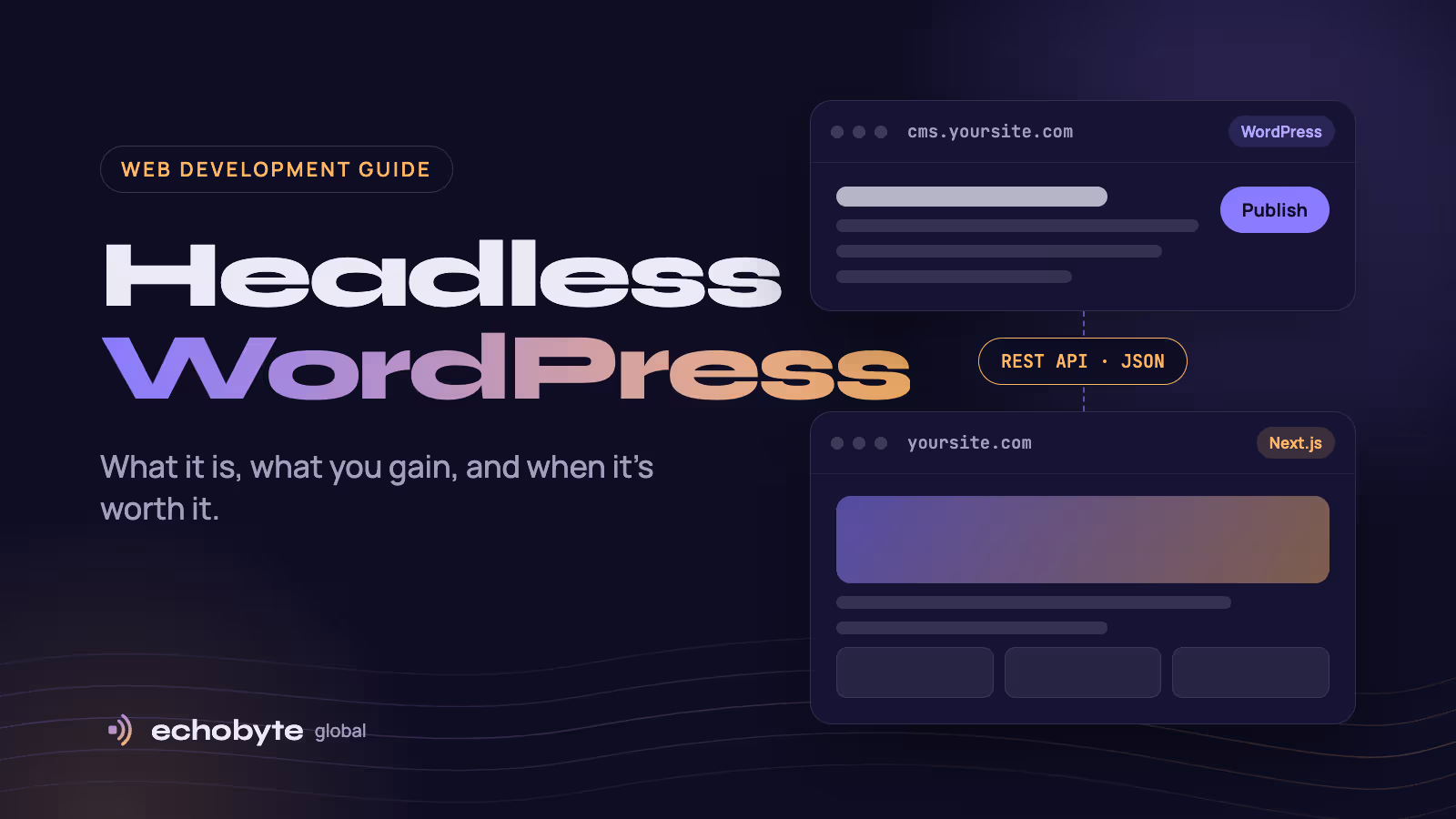
Headless WordPress means using WordPress only to write and store content, while a separate website, usually built with a framework like Next.js, shows that content to visitors. WordPress hands the posts over through its built-in API instead of rendering pages with a theme. The “head” that gets removed is the theme.
We rebuilt the Echobyte Global blog this way in October 2026. We still write in the normal WordPress editor on a private subdomain, and our Next.js site displays each post in our own design. This guide covers how it works, what you gain, what breaks, and how to decide whether it’s right for your site, based on what we learned doing it.
How does headless WordPress work?
A headless setup splits one website into two parts that talk through an API. Here is the path a post takes on our own site:
- You write in WordPress as usual. The editor, media library and user accounts work exactly as before.
- WordPress serves the content as data. Its built-in REST API returns posts, pages and images as JSON, for example at
yoursite.com/wp-json/wp/v2/posts. Some teams use the WPGraphQL plugin to get the same data through GraphQL instead. - A separate front end builds the pages. A framework such as Next.js fetches that data and turns it into pages in your own design.
- Visitors get pre-built pages. Pages are generated ahead of time and served from a global network, so visitors never touch the WordPress server.
- Publishing triggers a refresh. When you publish or update a post, WordPress notifies the front end, which rebuilds the affected pages within seconds.
The WordPress site itself can then live on a private address, such as cms.yourdomain.com, used only by your team.
Traditional vs headless WordPress
The editing experience stays the same; almost everything visitors see changes hands.
| Traditional WordPress | Headless WordPress | |
|---|---|---|
| What visitors load | WordPress and its theme | A separate front end, such as Next.js |
| Design freedom | Limited by the theme and page builder | Anything you can code |
| Page speed | Depends on theme, plugins and caching | Pre-built pages served from a global network |
| Page builders and front-end plugins | Work | Don’t work; features are rebuilt in code |
| Editing | WordPress editor | WordPress editor, but previews need extra setup |
| Hosting | One host | Two: one for WordPress, one for the front end |
| Who can build it | Anyone with a theme | A developer |
| Public attack surface | The WordPress site itself | The front end; WordPress can be hidden |
Benefits of headless WordPress
The main wins are speed, security and design freedom, without asking your team to learn a new editor.
- Faster pages. Visitors get pages that were built in advance and cached worldwide, so no database query or PHP runs when someone opens a post. Traffic spikes hit the cache, not your WordPress server.
- A smaller target for attackers. Visitors never reach WordPress, so the login page and plugins stay off your public site. You still need to keep WordPress updated, but a vulnerable plugin is far harder to reach.
- Complete design freedom. You build the front end in code, so custom layouts, animations and interactions don’t fight a theme or a page builder.
- One CMS for many channels. The same content can feed your website, a mobile app or another site, because the REST API is designed to bring WordPress content into separate applications.
- An editor people already know. WordPress runs 40.1% of all websites, according to W3Techs in October 2026. Your writers keep the tool they’re used to, while developers get a modern stack.
Drawbacks of headless WordPress
The trade-off is that you give up much of what makes WordPress easy, and you need a developer for anything visitors see.
- Front-end plugins stop working. Page builders, sliders, form plugins and anything else that changes what visitors see has no effect, because WordPress no longer draws the pages. That matters: Elementor alone runs on 31.5% of WordPress sites, according to W3Techs.
- You rebuild what WordPress gave you for free. Sitemaps, RSS feeds, SEO tags, redirects and site search all have to be built into the front end. We rebuilt our sitemap and RSS feed in Next.js.
- Previews take extra work. WordPress’s Preview button shows your old theme, not your real design, unless a developer builds a proper preview mode.
- Editor content needs styling. WordPress sends post content as raw HTML, and your front end must style every block type. On our first test, long lines in code blocks pushed our whole page sideways until we added styles for them.
- Two systems to run. You host and update WordPress and the front end separately, plus the connection between them.
- Higher cost. Building and maintaining two parts takes more developer time than installing a theme.
When is headless WordPress worth it?
Go headless when you already have, or plan to hire, a developer. Stay traditional when plugins are how you avoid needing one.
| Your situation | Go headless? | Why |
|---|---|---|
| Marketing site or blog where speed and a custom design matter | Yes | You get a fast, unique site while writers keep WordPress. |
| Content that feeds a website and an app | Yes | One API serves every channel. |
| Team that loves WordPress but has outgrown its theme | Yes | You replace the theme without retraining anyone. |
| Small business site built with a page builder, no developer | No | You’d lose the builder and need a developer for every change. |
| WooCommerce store | Only with a dedicated budget | Cart, checkout and accounts must all be rebuilt in the front end. |
| Site that depends on membership, course or booking plugins | No | Those plugins’ front-end features won’t carry over. |
How we built our headless WordPress blog with Next.js
Our setup uses no paid plugins and runs on ordinary hosting. These are the parts and why we chose them.
| Part | What we used | Why |
|---|---|---|
| Content | WordPress on a shared hosting plan, at a private subdomain | Cheap, familiar, and isolated from the public site |
| Data | WordPress’s built-in REST API | No extra plugin; one request returns a post with its image and author |
| Front end | Next.js, hosted on Netlify | Pre-built pages, served worldwide, matching the rest of our site |
| Freshness | A small WordPress file that notifies the site on publish | Pages refresh within seconds instead of waiting for a cache to expire |
| Safety | Every post’s HTML is cleaned before display | Only safe tags reach the page, even if an account is compromised |
| WordPress front end | Redirects every visit to the matching page on our main site | Keeps the WordPress copy out of search results |
Four lessons from the build:
- Hide the WordPress front end early. Otherwise Google can find two copies of every post.
- Never render WordPress HTML without cleaning it. A sanitizer takes minutes to add and closes a whole class of attacks.
- Use publish notifications, not live requests. Fetching from WordPress on every visit makes your site only as fast and reliable as your WordPress host.
- Test every block type before you publish. Code blocks, tables and embeds each need their own styles in your design.
SEO for headless WordPress: what you have to handle yourself
Headless WordPress can rank as well as any site, but nothing SEO-related happens automatically anymore. Your front end has to cover these seven things.
- Render content on the server. Search engines and AI crawlers should see the full article in the page’s HTML, not wait for JavaScript to load it. Google notes that JavaScript-heavy sites need extra SEO care.
- Output titles and meta descriptions. SEO plugins like Yoast can’t add tags to your front end. Read their fields through the API, or use each post’s excerpt as its description.
- Point canonical URLs at your public domain. Every page should name
yourdomain.comas its main address, never the WordPress subdomain. - Keep the WordPress copy out of search. Tick “Discourage search engines” in WordPress and redirect its pages to your main site.
- Generate your own sitemap. List every post with its last-updated date, then submit it in Google Search Console and Bing Webmaster Tools.
- Add structured data. Article or BlogPosting markup helps search engines understand the author, dates and images.
- Redirect old URLs. WordPress redirects changed slugs on its own pages, but your front end won’t unless you build it in.
Get these right and a headless blog has an advantage: pages that load fast and contain nothing but the content.
Headless WordPress FAQ
Do I need a plugin to use WordPress as a headless CMS?
No. The REST API is built into WordPress, so you can fetch posts, pages and media without installing anything. The WPGraphQL plugin is optional if your team prefers GraphQL.
Is headless WordPress good for SEO?
Yes, if your front end renders pages on the server and handles titles, canonical URLs, sitemaps and structured data. Without those, a headless site can rank worse than a normal WordPress site.
Can I still use the Gutenberg block editor?
Yes. Writers use the same editor. Your front end just needs styles for each block type you use, such as images, tables and code.
Which front end works best with headless WordPress?
Next.js is a popular choice for teams that use React, and it’s what we use. Nuxt and Astro work well too. Pick the framework your developers already know.
Is headless WordPress more secure?
It reduces what attackers can reach, because visitors never touch WordPress. It isn’t a replacement for updates: you still need to keep WordPress, its plugins and its login secure.
Headless WordPress vs a headless CMS like Sanity or Contentful: which is better?
WordPress wins when your team already knows it or you have years of content in it. A purpose-built headless CMS suits structured content, such as product data, and teams starting from scratch.
Where should I host headless WordPress?
WordPress can stay on any standard host, since only your team uses it. The front end goes on a platform built for modern frameworks, such as Netlify or Vercel.
Thinking about going headless? We build fast websites with Next.js and WordPress, and every project starts with a free discovery call.