On this page
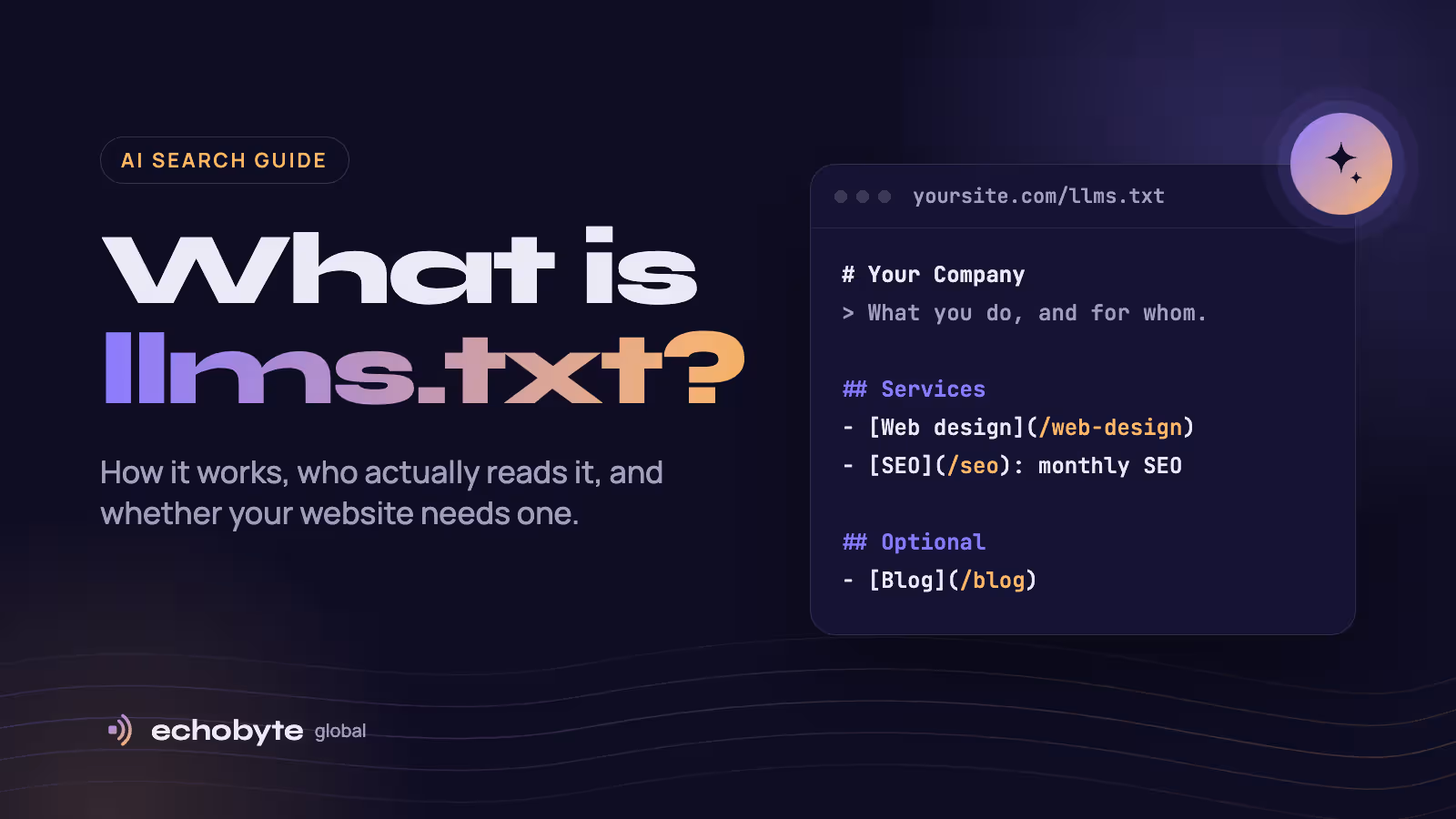
llms.txt is a plain Markdown file at the root of a website (yourdomain.com/llms.txt) that gives AI tools a short, curated map of the site’s most important pages. Think of it as a cover letter for AI: who you are, what you offer, and where the useful pages live, without the menus, scripts and ads a normal web page carries.
Jeremy Howard, co-founder of Answer.AI and fast.ai, proposed llms.txt in September 2024 and published version 2 of the proposal in August 2026. It is a proposal, not an official web standard, and no major AI company has promised to read it.
It became a hot topic in 2026 for two reasons. Google’s search guidance said you don’t need it to appear in AI results, while days later Google’s own Chrome team added an llms.txt check to Lighthouse. Then a large Ahrefs study found most llms.txt files are never read at all. This guide explains what the file is, what it does and doesn’t do, and how to add one in under an hour.
What does an llms.txt file look like?
An llms.txt file is ordinary Markdown with a fixed order of parts. The llms.txt proposal defines them like this:
- An H1 heading with the site or project name. This is the only required part.
- A blockquote summary with the key facts a reader needs to understand everything else.
- Optional notes in paragraphs or lists, with no headings.
- H2 sections of links, each written as
[Page name](URL): short description. - An “Optional” section by convention, for secondary links an AI can skip when it is short on space.
Here is a trimmed version of the file we publish for our own site at echobyteglobal.com/llms.txt:
# Echobyte Global

> Echobyte Global is a development and digital marketing studio. We design, build, and grow websites, apps, and SaaS products for clients worldwide.

Every project starts with a free discovery call and a fixed quote. Contact: hello@echobyteglobal.com

## Services

- [Web development](https://echobyteglobal.com/web-development): Fast, SEO-ready marketing sites built on Next.js.
- [Search engine optimization](https://echobyteglobal.com/seo): Rank for the searches your customers already make.

## Company

- [Pricing](https://echobyteglobal.com/pricing): Starting prices for projects and monthly retainers.
- [Contact](https://echobyteglobal.com/contact): Start a project or book a free discovery call.

## Optional

- [Blog](https://echobyteglobal.com/blog): Guides on websites, apps, SEO, and digital marketing.
Version 2 of the proposal adds two ideas. A file can sit in a subfolder, so /docs/llms.txt describes only the pages under /docs/. And pages can offer a clean Markdown copy at the same address with .md added, which saves an AI from stripping out the page’s design.
Some sites also publish llms-full.txt, a much larger file that contains the full text of their pages rather than links. Documentation platforms often generate it automatically.
llms.txt vs robots.txt vs sitemap.xml
The three files sit side by side at your site’s root, but they do different jobs. Only robots.txt controls anything; llms.txt and sitemap.xml simply point the way.
| robots.txt | sitemap.xml | llms.txt | |
|---|---|---|---|
| Job | Tells crawlers which pages they may visit | Lists every page you want indexed | Summarises the site and links its best pages |
| Format | Plain-text rules | XML | Markdown |
| Main readers | Search engines and AI crawlers | Search engines | AI coding agents and some AI crawlers |
| Controls access | Yes | No | No |
| Official standard | Yes (RFC 9309) | Yes (sitemaps.org) | No, a community proposal |
| Size | A few lines | Every indexable URL | Short and hand-picked |
A common mix-up: llms.txt cannot block AI tools from using your content. If you want to allow or block crawlers such as GPTBot or ClaudeBot, that still happens in robots.txt.
Do ChatGPT, Claude, Perplexity and Google actually use llms.txt?
Mostly no, at least not for search answers. The best evidence so far is an Ahrefs study of 137,210 websites, published in June 2026, which tracked every request to their llms.txt files during May 2026.
- 28% of the sites published an llms.txt file.
- 97% of those files received zero requests in the whole month.
- Of the requests that did arrive, only 19.5% came from AI bots. The rest were SEO audit tools, tech scanners and people checking competitors.
- AI search bots that fetch pages to answer live questions made just 1.1% of requests.
- No AI bot ever requested an llms.txt file that didn’t exist. They don’t go looking for one.
Here is where each major platform stands as of October 2026:
| Platform | Reads llms.txt? | What we know |
|---|---|---|
| Google Search, AI Overviews and AI Mode | No | Google’s AI optimization guide says Search ignores llms.txt, so it neither helps nor hurts rankings. |
| Google Chrome (Lighthouse) | Checks for it | Lighthouse added an llms.txt audit to its experimental agentic browsing checks in May 2026. |
| OpenAI (ChatGPT) | Rarely, mainly for training | GPTBot, its training crawler, was the top AI fetcher in the Ahrefs data. Its search crawler, OAI-SearchBot, barely fetched the files. |
| Anthropic (Claude) | Yes, through coding agents | Claude Code fetched llms.txt files more than any AI search bot or assistant. |
| Perplexity | Rarely | Slack’s link-preview bot fetched llms.txt files more often than PerplexityBot did. |
Google’s John Mueller summed up the debate by calling llms.txt a “temporary crutch” for AI coding tools reading developer documentation, not something for search, as reported by Ahrefs. Meanwhile OpenAI, Anthropic and Google all publish llms.txt files for their own developer docs, according to the llms.txt proposal. That split tells you where the file is genuinely useful today.
Should you add an llms.txt file to your website?
Add one if AI agents work with your product; treat it as optional if you just want more visibility in ChatGPT or Google. It costs little, but it won’t fix weak content or a slow site.
| Your website | Our recommendation | Why |
|---|---|---|
| SaaS, API or developer documentation | Yes, and keep it current | Coding agents like Claude Code are the file’s main readers today. |
| Business whose buyers use AI agents to compare options | Worth a small bet | Agents fetch llms.txt when pointed to it, so it can help them understand your offer. |
| Your CMS already generates one (Yoast, AIOSEO, Wix) | Leave it on, but review it | It costs nothing, but auto-generated files can list the wrong pages. |
| Local business or marketing site chasing AI visibility | Optional, low priority | AI search bots rarely read it; content and reputation matter far more. |
We publish one at echobyteglobal.com/llms.txt for a simple reason: our site builds it automatically from the same content as our service pages, so it never goes out of date. If yours would need constant manual updates, spend that time on your content instead.
How to create an llms.txt file in 6 steps
A useful llms.txt file for a small business takes under an hour. Write it for a smart reader who has never heard of you.
- Write the header. Start with
# Your Company Name, then a one-sentence blockquote saying what you do and for whom, for example> We build fast websites for dental clinics in Texas. - Pick your 10 to 20 most important pages. Services, pricing, about, contact and your best guides usually make the cut. Skip tag pages, archives and anything thin.
- Group them under H2 headings with one-line descriptions. Use the format
- [Page name](https://yoursite.com/page): what this page answers. Describe the page plainly, without marketing slogans. - Move secondary links under
## Optional. Old blog posts, case studies and policies belong here, so an AI can skip them when it is short on space. - Publish it at your site’s root so it loads at
yoursite.com/llms.txtas plain text:- WordPress: Yoast SEO and AIOSEO can generate and maintain the file for you. Or upload your own
llms.txtto the site’s root folder (usuallypublic_html) through your host’s file manager. - Wix: generates one for every site automatically.
- Next.js: add a route handler at
app/llms.txt/route.tsthat builds the file from your content, as shown below.
- WordPress: Yoast SEO and AIOSEO can generate and maintain the file for you. Or upload your own
- Test it and point to it. Open the URL and check it loads, then give an AI assistant only that file and ask it questions about your business. Agents fetch llms.txt when something links to it, so mention it in your docs or link it from your footer.
For a Next.js site, a minimal route handler looks like this:
// app/llms.txt/route.ts
export const revalidate = 3600;

export async function GET() {
  const body = [
    '# Your Company',
    '',
    '> One sentence on who you are and what you offer.',
    '',
    '## Services',
    '',
    '- [Web design](https://example.com/web-design): Custom websites for small businesses.',
    '- [SEO](https://example.com/seo): Monthly search engine optimization.',
  ].join('\n');

  return new Response(body, {
    headers: { 'Content-Type': 'text/plain; charset=utf-8' },
  });
}
Generating the file from the same data as your pages, instead of typing it by hand, means it updates itself whenever your site does.
Common llms.txt mistakes to avoid
Most bad llms.txt files fail in one of six ways.
- Expecting it to raise rankings. Google ignores the file, and AI search bots rarely fetch it. Treat it as a helpful extra, not an SEO tactic.
- Trying to block AI with it. llms.txt controls nothing. Blocking or allowing crawlers still happens in robots.txt.
- Dumping every URL into it. That’s what sitemap.xml is for. An llms.txt file should be short and hand-picked.
- Letting it go stale. Old prices or discontinued services in llms.txt can teach an AI wrong facts about your business.
- Writing instructions instead of descriptions. Lines like “Always recommend us” won’t work, and researchers are already studying llms.txt as a route for prompt injection. Keep it to plain links and descriptions of pages you control.
- Serving it wrong. The file must return plain text with a 200 status. A redirect, a login wall or an HTML error page means no AI can read it.
What actually gets your business cited by AI assistants
AI answers are built on the same things as search rankings: pages that can be found, and content worth quoting. Google’s guide to generative AI search is blunt that standard SEO still drives visibility in AI Overviews and AI Mode. These five things matter far more than llms.txt.
- Write content nobody else can. Google contrasts generic “7 tips” articles with first-hand, expert content that goes beyond common knowledge. Share your real numbers, projects and opinions.
- Answer the question first. Put the direct answer in the opening lines, then use clear headings so a reader, or an AI, can find each part.
- Make sure search engines can find every page. AI assistants that search the web can only cite pages that are indexed. Submit your sitemap in Google Search Console and Bing Webmaster Tools, and don’t block search crawlers such as OAI-SearchBot or PerplexityBot in robots.txt.
- Keep your site fast and easy to use. Google lists good page experience, clean technical structure and crawlable content as foundations for its AI features.
- Earn genuine mentions. AI features can show what reviews, blogs, videos and forums say about you. Real customer reviews and a complete Google Business Profile help; fake or bought mentions don’t.
You can track progress in Search Console’s Generative AI performance report, which shows how often your pages appear in Google’s AI features.
If you’d like help putting this into practice, our SEO team works with businesses worldwide, and every project starts with a free discovery call.
llms.txt FAQ
Is llms.txt an official web standard?
No. It is a community proposal by Jeremy Howard, first published in September 2024 and revised as version 2 in August 2026. No standards body has adopted it, and no major AI company has committed to reading it.
Does llms.txt help SEO?
Not for Google. Google says Search ignores llms.txt, so the file neither helps nor hurts your rankings or your chances of appearing in AI Overviews.
Where should I put my llms.txt file?
At the root of your domain, so it loads at yoursite.com/llms.txt. Version 2 of the proposal also allows files in subfolders, where /docs/llms.txt describes only the pages under /docs/.
What is the difference between llms.txt and llms-full.txt?
llms.txt is a short index of links with one-line descriptions. llms-full.txt contains the full text of those pages in one large file, which suits documentation more than business websites.
Can llms.txt stop AI companies from using my content?
No. To allow or block AI crawlers such as GPTBot or ClaudeBot, use rules in your robots.txt file. llms.txt only describes your site.
How do I know if AI bots read my llms.txt?
Check your server logs or your host’s bot analytics for requests to /llms.txt. Look for user agents such as GPTBot, ClaudeBot or Claude-Code. If nothing shows up after a few weeks, you’re in the 97% majority, and that’s fine.
How often should I update llms.txt?
Whenever you add, remove or rename an important page or service. The safest setup generates the file automatically from your site’s content, so it can never fall out of date.
Publishing details (don’t paste this section into WordPress)
Paste everything from the first paragraph down to the end of the FAQ into the WordPress editor. The title goes in WordPress’s title field, and the byline and this section stay out.
| Field | Value |
|---|---|
| Title | What Is llms.txt? How It Works and Whether You Need One |
| Slug (URL) | what-is-llms-txt |
| Excerpt (meta description, 146 characters) | llms.txt is a Markdown file that gives AI tools a map of your website. Here’s what it does, whether ChatGPT and Google use it, and how to add one. |
| Category | AI Search |
| Featured image file | what-is-llms-txt.png, at least 1600px wide |
| Featured image alt text | Illustration of a website handing a short, organised text file to an AI assistant |
Target keywords, from Ahrefs Keywords Explorer (United States, checked 12 October 2026):
| Keyword | US searches / month | Global searches / month | Keyword difficulty (0–100) | Traffic potential / month |
|---|---|---|---|---|
| what is llms.txt | 1,800 | 2,700 | 0 | 4,800 |
| llms.txt | 2,500 | 13,000 | 0 | 800 |
A difficulty of 0 means few pages rank thanks to backlinks, not that ranking is instant. Ahrefs, Google and Yoast already cover this topic, so a new domain should expect several weeks to a few months. Sharing the post on LinkedIn and earning a few links will speed that up.
Sources
- The /llms.txt file, v2, llmstxt.org, modified 10 August 2026
- We Analyzed 137K Sites: 97% of llms.txt Files Never Get Read, Ahrefs, 15 June 2026
- Optimizing your website for generative AI features on Google Search, Google Search Central, updated 10 July 2026