On this page
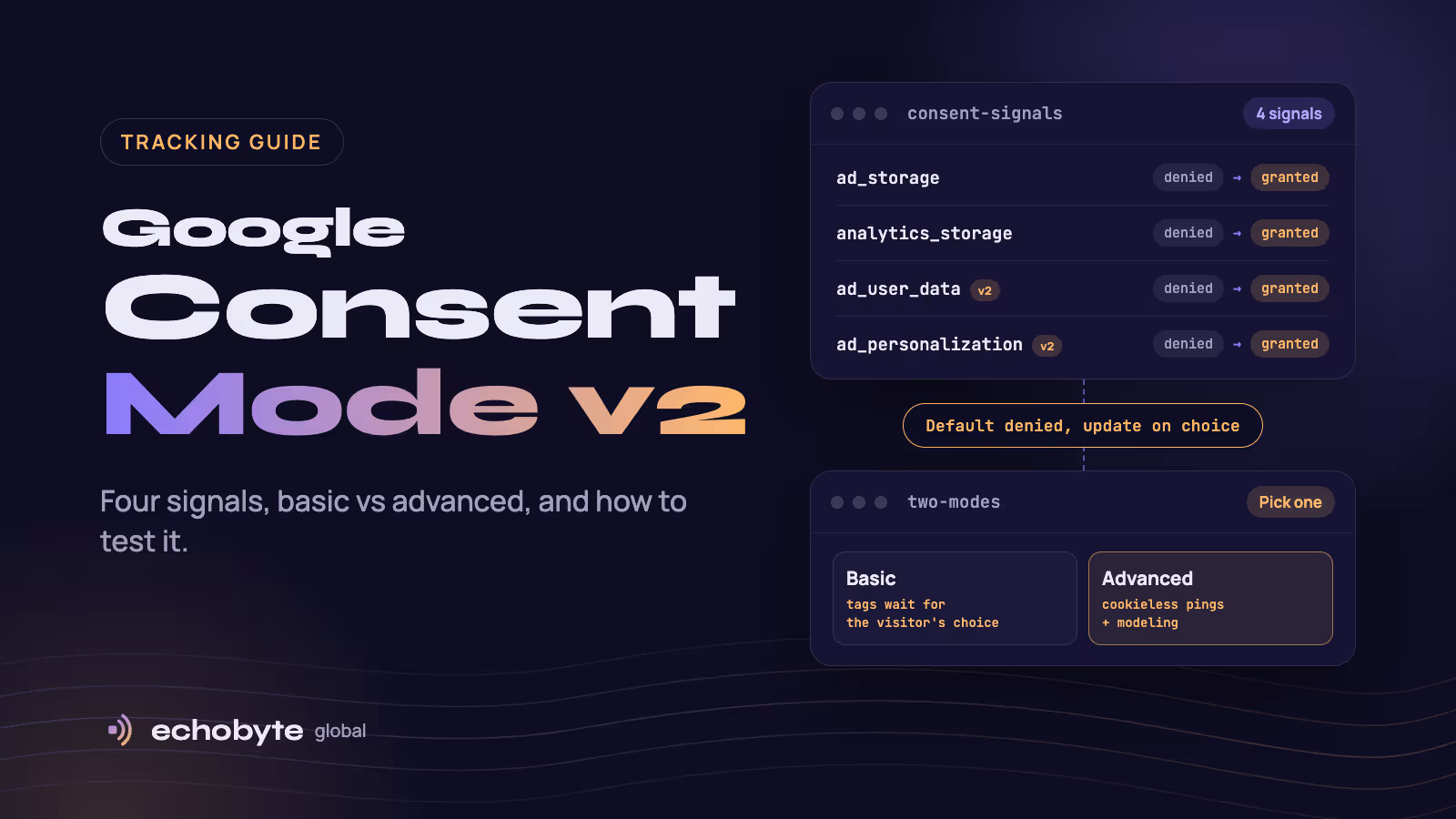
Google Consent Mode v2 is a way for your website to tell Google’s tags what each visitor agreed to, using four consent signals: ad_storage, analytics_storage, ad_user_data and ad_personalization. If you use Google Analytics 4 or Google Ads and have visitors from the European Economic Area (EEA), the UK or Switzerland, Google requires it to keep audience, remarketing and conversion features working. It is a Google policy, not a law, and it does not replace a proper cookie banner or legal advice. Setup has three parts: a consent banner, default settings that deny consent until the visitor chooses, and testing.
This guide explains the four signals, who needs Consent Mode v2, basic versus advanced mode, how to set it up with a certified banner, Google Tag Manager or code, how to test it, and the mistakes that break it. Our website launches include GA4 and Consent Mode v2 setup, so this comes from practice. This is general information, not legal advice. Google’s requirements and thresholds change, so check its current documentation. Information was checked in November 2026.
Key takeaways
- Consent Mode v2 passes four consent signals from your banner to Google’s tags. v2 added
ad_user_dataandad_personalization. - You need it if you use Google Ads or GA4 advertising features and have visitors from the EEA, UK or Switzerland.
- Defaults must be set to denied before any Google tag fires, then updated when the visitor makes a choice.
- Advanced mode sends cookieless pings that can feed modeling, but modeling only starts above traffic thresholds that many small sites miss.
- Consent Mode controls Google tags only. Other trackers need their own consent handling.
What is Google Consent Mode v2?
Consent Mode lets Google tags adjust their behavior based on the visitor’s consent choices. When a visitor declines, tags change what they store and send. Version 2 added two signals to the original two, in line with the EU’s Digital Markets Act.
| Signal | What it controls | Added in |
|---|---|---|
ad_storage | Storing advertising-related data such as cookies | v1 |
analytics_storage | Storing analytics data such as visit duration | v1 |
ad_user_data | Sending user data to Google for advertising purposes | v2 |
ad_personalization | Whether data can be used for personalized advertising | v2 |
Google’s consent mode developer guide documents the signals and the code used to set them. Do not confuse v1 and v2 with basic and advanced mode. The versions refer to which signals exist, and basic and advanced refer to how you implement it.
Who needs Consent Mode v2?
Anyone using Google Ads or GA4 advertising features with visitors from the EEA, UK or Switzerland. As iubenda explains, the requirement comes from Google, not from a law, and it applies wherever your business is based.
| Your situation | Do you need it? |
|---|---|
| Google Ads conversion tracking or remarketing with EEA, UK or Swiss visitors | Yes |
| GA4 with advertising features (audiences, Google signals) and those visitors | Yes |
| Publisher serving personalized ads through AdSense, Ad Manager or AdMob there | Yes, plus a Google-certified consent platform that supports TCF |
| GA4 only, no ads features, no visitors from those regions | Google does not require it, though other privacy laws may apply |
| Visitors only from outside the EEA, UK and Switzerland | Not required by Google, but check local rules |
Reported timeline: Google made Consent Mode v2 required for relevant ads and analytics use on March 6, 2024. Industry sources report stricter enforcement from July 2025, when accounts without it began losing conversion tracking and remarketing for EEA users. Iubenda and scandiweb also report 2026 changes, including that Consent Mode becomes the main control over whether Google Ads cookies collected by GA4 reach Google Ads. Confirm the current rules in Google’s documentation before you change a live setup.
Should you use basic or advanced mode?
Basic mode blocks Google tags until the visitor chooses. Advanced mode loads them in a restricted state and sends cookieless pings when consent is denied.
| Question | Basic mode | Advanced mode |
|---|---|---|
| Do tags load before the choice? | No | Yes, in a denied state |
| What is sent if the visitor declines? | Nothing | Cookieless pings without identifiers |
| Modeling of lost conversions | Not available | Possible above Google’s thresholds |
| Easier to approve legally | Usually | Some legal teams object to any request before consent |
| Setup | Simpler | More configuration |
Modeling needs enough data. According to third-party guides such as e-dialog and Cookie-Script, GA4 behavioral modeling needs at least 1,000 events a day with analytics_storage denied for seven days plus at least 1,000 daily users with it granted on seven of the previous 28 days. Google Ads conversion modeling needs at least 700 ad clicks over seven days for each domain and country grouping.
Choose basic if your legal team will not approve any request before consent, Google Ads is a small part of your European revenue, or you are far below those thresholds. Choose advanced if you spend heavily on Google Ads in Europe, your campaigns rely on smart bidding, and your legal team signs off. If you don’t reach the thresholds, advanced mode adds cost and legal exposure without recovering data.
How do you set up Consent Mode v2?
There are three ways: a certified consent platform, Google Tag Manager with a consent template, or code.
| Method | Best for | Notes |
|---|---|---|
| Google-certified consent platform (CMP) | Most businesses, and required for publishers | Google’s recommended route. Handles the banner, defaults and updates. |
| Google Tag Manager with a CMP template | Sites already using Tag Manager | Uses Tag Manager’s consent settings and APIs |
Manual gtag.js code | Developers who want full control | Simple but you must maintain the banner and rules yourself |
Step 1: Choose your banner
A certified CMP such as Cookiebot, iubenda or CookieScript sends the signals for you. Look for a Google-certified CMP with Consent Mode support, separate choices for analytics and advertising, and a “reject all” button that is as easy to use as “accept all”, which European regulators expect.
Step 2: Set defaults to denied before any Google tag loads
The default must run first, so a tag can never fire before the visitor has chosen. The pattern in Google’s guide looks like this:
<script>
  window.dataLayer = window.dataLayer || [];
  function gtag(){ dataLayer.push(arguments); }

  gtag('consent', 'default', {
    'ad_storage': 'denied',
    'ad_user_data': 'denied',
    'ad_personalization': 'denied',
    'analytics_storage': 'denied',
    'wait_for_update': 500
  });
</script>
<!-- Load Google Tag Manager or gtag.js after this block -->
wait_for_update gives an asynchronous banner a short time, here 500 milliseconds, to send its update before tags fire. You can also set different defaults by region, for example denied for the EEA, UK and Switzerland and granted elsewhere, if your legal advice allows.
Step 3: Update when the visitor chooses
When the visitor accepts, update the signals they agreed to:
<script>
  function allConsentGranted() {
    gtag('consent', 'update', {
      'ad_user_data': 'granted',
      'ad_personalization': 'granted',
      'ad_storage': 'granted',
      'analytics_storage': 'granted'
    });
  }
</script>
If they reject, or change their mind later, send the same call with denied. Store the choice, so a returning visitor’s saved preference is applied on every page load before tags run.
Step 4: Connect Tag Manager and your tags
If you use Google Tag Manager, use your CMP’s template, or Tag Manager’s consent APIs (setDefaultConsentState and updateConsentState), and keep the default command as early as possible. Google tags have built-in consent checks. Other tags need their own consent requirements set in Tag Manager. Two optional settings help: url_passthrough keeps ad click information in URLs when cookies are denied, and ads_data_redaction removes ad identifiers from requests when advertising consent is denied.
Step 5: Handle your platform
- Next.js and custom sites. Add the default consent script before the Tag Manager or Google tag loads, store the visitor’s choice, and apply it on page load. Reserve space for the banner so it does not cause layout shift or delay the main content.
- Shopify and WordPress. Use a CMP app or plugin that supports Consent Mode v2, and check its regional settings and which Google tags it covers.
How do you test Consent Mode v2?
- Preview in Tag Manager. Tag Assistant or Tag Manager’s preview shows the consent state for each event. Defaults should read denied before any choice.
- Check network requests. Open your browser’s developer tools and look at requests to Google. The
gcsparameter shows the state:G100means advertising and analytics storage are both denied, andG111means both are granted. Thegcdparameter carries the v2 signals. - Test each path. Accept all, reject all, choose analytics only, and reload to confirm the saved choice is applied.
- Test from a European location. Region settings only trigger for visitors in those regions, so use a VPN or a regional test.
- Check GA4 and Google Ads. GA4’s DebugView should show events, and Google Ads diagnostics should show “Consent mode is implemented”.
What are the most common mistakes?
| Mistake | What happens | Fix |
|---|---|---|
| Default set after the Google tag loads | Tags fire before the visitor chooses | Put the default command first |
| Only two signals set | Remarketing and audience features break | Set all four |
| A banner with no easy “reject” | Consent may not be valid | Give accept and reject equal prominence |
| A banner not connected to Consent Mode | Google never learns the visitor’s choice | Use a CMP integration or send the updates yourself |
| Saved choices not applied on return visits | Returning visitors are treated as new | Read the stored choice on every page load |
| Testing only from your own country | Regional rules never trigger | Test from the EEA |
| Assuming other trackers are covered | Meta and other pixels still fire before consent | Add consent rules for each non-Google tag |
| Expecting full data back | Reports show fewer conversions than before | Compare against your own order or lead records |
How much data do you lose, and how much comes back?
Some data loss is unavoidable. Visitors who decline cannot be tracked in the usual way, so reported visits and conversions drop. In advanced mode, Google can model some of the gap, but only above the thresholds above. One guide reports Google says modeling recovers, on average, more than 70% of ad-click-to-conversion journeys lost to declined consent. Treat that as Google’s claim for sites that qualify.
Most small sites will not reach the thresholds. Plan for lower reported numbers, and compare them to your own records, such as form submissions, calls and orders in your backend. Our analytics service can set up that tracking, and our Google Ads management pricing guide covers what a good quote should include for conversion tracking.
Does Consent Mode cover all your trackers?
No. Consent Mode only controls Google’s tags. A Meta pixel, a chat widget or a heatmap tool can still set cookies before consent unless you block or gate them separately. Your consent platform should list and control every tracker. Our website audit checklist includes a check for consent and a check for duplicate or missing tags.
Is Consent Mode v2 a legal requirement?
It is a Google requirement, not a law. Privacy laws such as the GDPR and the ePrivacy Directive, and the UK’s equivalents, set the legal rules for cookies and tracking. Other places, such as California and India, have their own. A banner that implements Consent Mode correctly helps you meet Google’s rules, but it does not make you compliant with the law. Ask a lawyer to review your banner wording and your choice of basic or advanced mode.
How do we handle consent at Echobyte?
Our web development service starts from $1,500 per project, and launches include domain, SSL, GA4 and Consent Mode v2 setup. When we redesign or rebuild a site, we carry tracking and consent settings across, as the website migration checklist recommends. For existing sites, our analytics service reviews tags, conversions and consent, and our paid ads service tracks campaigns through to revenue, with ad spend paid directly to Google. We are not lawyers, so we work with your legal advice on wording and settings. See our pricing page for starting prices.
Google Consent Mode v2 FAQ
What is Google Consent Mode v2?
It is Google’s system for passing a visitor’s consent choices to Google tags using four signals: ad_storage, analytics_storage, ad_user_data and ad_personalization. Tags then change what they store and send.
Do I need Consent Mode v2?
Yes, if you use Google Ads or GA4 advertising features and have visitors from the EEA, UK or Switzerland. It is a Google requirement, not a law.
What is the difference between basic and advanced mode?
Basic mode blocks Google tags until the visitor chooses. Advanced mode loads them in a denied state and sends cookieless pings, which can support modeling if you meet Google’s traffic thresholds.
Do I need a certified CMP?
Publishers serving personalized ads through AdSense, Ad Manager or AdMob in those regions need a Google-certified CMP that supports TCF. Advertisers are strongly advised to use one. Google’s list of certified providers is the place to check.
How do I set up Consent Mode v2 with Google Tag Manager?
Use your CMP’s Tag Manager template, or Tag Manager’s consent APIs. Set defaults to denied before tags fire, update when the visitor chooses, and set consent requirements on non-Google tags.
How do I test Consent Mode?
Use Tag Assistant or Tag Manager preview to see consent states, check the gcs and gcd values on Google requests, test accept, reject and return visits, and confirm GA4 and Google Ads diagnostics.
Will I lose data with Consent Mode?
Yes. Visitors who decline are not tracked normally. Advanced mode can model some of the loss above Google’s thresholds, but most small sites should plan for lower reported numbers.
Is Consent Mode v2 enough for GDPR?
No. It supports Google’s rules, but GDPR and ePrivacy compliance depend on your banner, your wording, what you collect and how you handle other trackers. Get legal advice.
Need your tracking and consent set up properly? Our team configures GA4, Tag Manager and Consent Mode v2 and tests them before launch, and every project starts with a free discovery call and a fixed quote.
Sources
- Set up consent mode on websites, Google for Developers
- What is Google Consent Mode?, iubenda
- Google Consent Mode v2 for eCommerce, scandiweb
- Consent Mode: Basic vs. Advanced, e-dialog
- How Consent Mode v2 Affects Non-Compliant Ad Accounts, Cookie-Script
- Google-certified CMP requirement, Cookiebot
- Google Blocks Ad Tracking for Sites Without Consent Mode v2, Hello Partner, July 2025