On this page
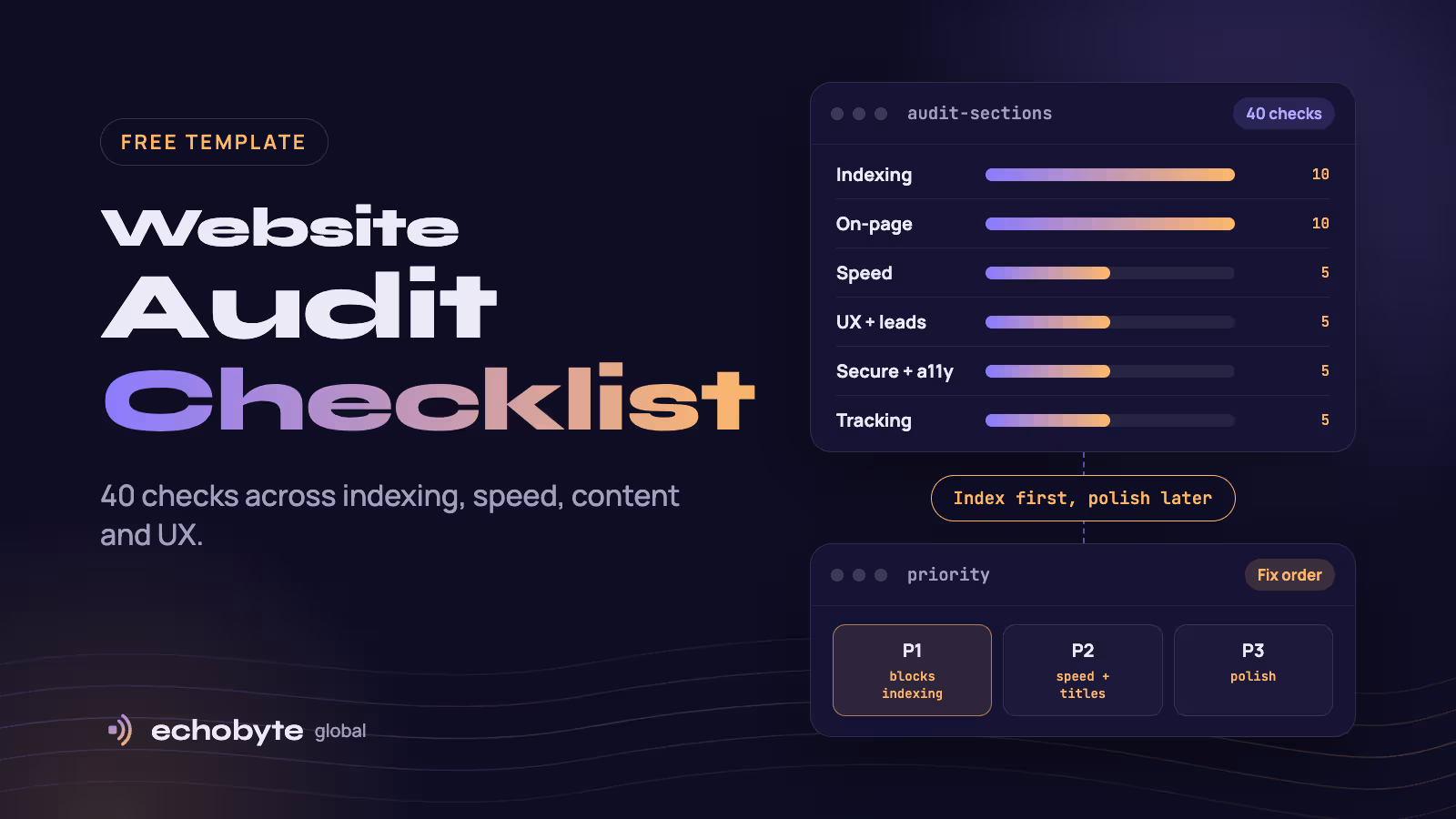
A website audit checklist six things: whether Google can crawl and index your pages, how fast and stable the site is, whether the content and on-page SEO match what people search for, whether visitors can convert, whether the site is secure and accessible, and whether tracking works. Run the 40 checks below in that order, because a page that is not indexed cannot rank, however good it is. A small site takes two to four hours with free tools.
We ran this checklist on our own site, echobyteglobal.com, in its first month, and we share what we found, including mistakes. Use the tables as your template: copy them into Google Sheets or Excel and add columns for status, owner and notes.
Key takeaways
- Audit in order: indexing first, then speed, on-page, user experience, security and accessibility, and tracking.
- Mark each issue P1 (blocks indexing or breaks pages), P2 (hurts speed or clicks) or P3 (polish), and fix in that order.
- Free tools cover most of it: Google Search Console, PageSpeed Insights, Screaming Frog and Ahrefs Webmaster Tools.
- Most serious problems are simple: a stray noindex, a wrong canonical, a broken redirect or a missing sitemap.
- Audit quarterly, and after any redesign or migration.
What is a website audit?
A website audit is a structured review of how well a site works for search engines and for visitors. An SEO audit focuses on crawling, indexing and rankings. A content audit reviews each page’s quality. A UX audit looks at usability and conversion. This checklist combines all three, since problems in one often cause problems in another. Our SEO audit cost guide explains what paid audits include and cost.
Which free tools do you need?
| Tool | What it checks |
|---|---|
| Google Search Console | Indexing, sitemaps, search performance, Core Web Vitals |
| Bing Webmaster Tools | Bing indexing, which also feeds some AI search tools |
| PageSpeed Insights | Speed and Core Web Vitals, lab and real-user data |
| Screaming Frog SEO Spider (free to 500 URLs) | Crawls your site for titles, headings, status codes, links |
| Ahrefs Webmaster Tools (free for verified sites) | Site audit issues and backlinks |
| Google Analytics 4 | Whether tracking and conversions work |
| WAVE or axe | Accessibility errors |
The website audit checklist: 40 checks
1. Crawling and indexing (10 checks)
These come first. If Google cannot reach or keep a page, nothing else matters. Google’s technical requirements are simple: Googlebot is not blocked, the page returns a 200 status, and it has indexable content.
| # | Check | How to check | Pass if |
|---|---|---|---|
| 1 | robots.txt | Open /robots.txt | Important pages are not blocked and the sitemap is listed |
| 2 | XML sitemap | Search Console, Sitemaps report | Submitted, no errors, lists only live canonical URLs with correct dates |
| 3 | Indexed pages | Search Console, Pages report | Important pages are indexed, and “not indexed” reasons are understood |
| 4 | No stray noindex | URL Inspection and a crawl | No noindex on pages you want to rank |
| 5 | Canonical tags | Crawl and view source | Each page points to itself, not to staging or another site |
| 6 | One site version | Try http, https, www and non-www | All redirect with 301 to one https version |
| 7 | Status codes | Crawl | 200 for live pages, 301 for moved pages, 404 or 410 for removed ones, no soft 404s |
| 8 | Redirect chains and loops | Crawl | Old URLs reach the final page in one hop, never more than three |
| 9 | Orphan pages and click depth | Crawl compared with the sitemap | Every page has internal links, and key pages are within three clicks |
| 10 | JavaScript rendering | URL Inspection, view the tested page | Main text and links appear in the rendered HTML |
2. Speed and stability (5 checks)
| # | Check | How to check | Pass if |
|---|---|---|---|
| 11 | Core Web Vitals | PageSpeed Insights, Search Console | LCP 2.5 s or less, INP 200 ms or less, CLS 0.1 or less |
| 12 | Images | PageSpeed and DevTools | Modern formats, correct sizes, lazy-loaded below the fold, main image not lazy-loaded |
| 13 | Fonts | DevTools | Few font files, preloaded, text visible while fonts load |
| 14 | Scripts and third parties | PageSpeed, DevTools | No large scripts blocking the page, and unused tags removed |
| 15 | Hosting and caching | DevTools, network tab | Fast server response, a CDN and sensible caching |
Google’s thresholds are measured at the 75th percentile of real visits. See web.dev’s guide to Core Web Vitals.
3. On-page SEO and content (10 checks)
| # | Check | How to check | Pass if |
|---|---|---|---|
| 16 | Title tags | Crawl | Unique per page, about 50 to 60 characters, main topic first |
| 17 | Meta descriptions | Crawl and search results | Unique, about 150 characters, readable, not cut off |
| 18 | Headings | Crawl | One H1, logical H2 and H3 order with no skipped levels |
| 19 | Duplicate headings | Read the page | No two headings with the same text on one page |
| 20 | Image alt text | Crawl | Describes the image, no keyword stuffing |
| 21 | URLs | Crawl | Short, lowercase, readable, no parameters on key pages |
| 22 | Internal links | Crawl | Descriptive anchors, and each key page has several links in |
| 23 | Duplicate and thin content | Crawl, Search Console | No near-identical pages, and thin pages merged or improved |
| 24 | Search intent | Search your keyword | The page answers the query early and matches what ranks |
| 25 | Trust signals | Read the page | Named author, dates, sources, contact details, a real About page |
Structured data (Article, Organization, Breadcrumb) is useful when it matches visible content. Check it with Google’s Rich Results Test. It will not fix weak content.
4. User experience and conversion (5 checks)
| # | Check | How to check | Pass if |
|---|---|---|---|
| 26 | First screen | Load on a phone and a laptop | A new visitor can tell what you offer and for whom in seconds |
| 27 | Main call to action | Click through | Visible, specific and working on every key page |
| 28 | Forms | Submit a test enquiry | Works, confirms, reaches the right inbox and blocks spam |
| 29 | Navigation | Use the site on a phone | Simple menu, and key pages reachable in one or two taps |
| 30 | Broken links and 404 page | Crawl | No broken internal links, and a helpful 404 page |
5. Security, mobile and accessibility (5 checks)
| # | Check | How to check | Pass if |
|---|---|---|---|
| 31 | HTTPS | Browser padlock, crawl | Valid certificate, no mixed content |
| 32 | Mobile usability | Test on a real phone | Readable text, tappable buttons, no sideways scrolling |
| 33 | Color contrast | WAVE or axe | Text meets WCAG AA contrast of 4.5:1, or 3:1 for large text |
| 34 | Keyboard and screen readers | Tab through the page | Every control reachable and labeled, with visible focus |
| 35 | Privacy and consent | Check cookie banner and policy | Consent works, and policies are linked in the footer |
6. Tracking and off-site (5 checks)
| # | Check | How to check | Pass if |
|---|---|---|---|
| 36 | Analytics and conversions | GA4 real-time and reports | Key actions (form, call, purchase) recorded once each |
| 37 | Search Console and Bing | Check ownership | Both verified, with sitemaps submitted |
| 38 | Duplicate or missing tags | Tag preview, browser extension | Each tag fires once on the right pages |
| 39 | Backlinks | Ahrefs Webmaster Tools | No manual actions, and junk links reviewed rather than panicked over |
| 40 | Business profiles | Search your brand | Name, description and links consistent across your profiles |
Our analytics service sets up tracking and dashboards if you want help with sections 4 and 6.
What did we find when we audited our own site?
We ran these checks on echobyteglobal.com in its first month and found real problems alongside good news. We share them because most audit guides show hypothetical examples.
| What we found | Why it matters | The fix |
|---|---|---|
| New posts took about two days to appear on the blog index | Slow discovery of new content | Refresh the index and sitemap automatically on publish |
| Meta descriptions were cut off at about 160 characters | Weaker search snippets | Write excerpts of 155 characters or less |
| A blank excerpt produced an auto-generated meta description | A random sentence became the snippet | Always set the excerpt by hand |
| An internal publishing-notes block was visible on a live post | Looks careless and confuses readers | Remove it, then check every live page after publishing |
| A post used H3 and H4 where it should have used H2 and H3 | Broken outline for readers and crawlers | Fix heading levels (check 18) |
| Identical headings appeared twice on a page, creating a duplicate anchor | Confusing navigation and contents list | Rename one heading (check 19) |
| An SEO plugin inserted the keyword into alt text and an intro | Awkward, stuffed wording | Review automatic edits (checks 20 and 24) |
| Every “Keep reading” block showed the same three newest posts | Wasted internal links | Show related posts instead (check 22) |
More than 50 junk backlinks from numbered .xyz domains appeared in October | Looks alarming but is common spam | Ignore, and do not disavow unless Google sends a manual action |
| A test of a new post found no blockers: it returned 200 to normal visitors and to Googlebot, had no noindex, a self-referencing canonical and a sitemap entry | Shows the delay was normal new-site discovery, not a fault | Wait, request indexing and keep publishing quality |
The last two rows are the useful lesson. A new domain can look broken in third-party tools while being technically fine. Two weeks in, Ahrefs still showed no organic keywords and a Domain Rating of zero. Check the facts (checks 1 to 10), fix what is broken and be patient with the rest.
How should you prioritize the fixes?
| Priority | What it covers | Examples from the checklist | When |
|---|---|---|---|
| P1 | Anything that blocks indexing or breaks pages | Checks 1 to 10, 28, 30, 31 | This week |
| P2 | Problems that hurt speed, snippets or internal linking | Checks 11 to 15, 16 to 22, 36 to 38 | Within a month |
| P3 | Polish and long-term improvements | Checks 23 to 27, 29, 32 to 35, 39, 40 | Over the quarter |
How often should you audit a website?
Run the full checklist every quarter, and run sections 1 and 6 monthly. Run it again after any redesign, replatform or domain change. Our website migration checklist covers the extra steps for moves, and our website redesign cost guide explains how to redesign without losing rankings.
Should you audit your site yourself or hire help?
| Your situation | Best approach |
|---|---|
| A small site with under about 50 pages | DIY with this checklist and free tools |
| A site that depends on search for leads or sales | A paid audit, then fixes with a developer |
| An online store with thousands of URLs | A specialist with a crawler and server-log access |
| A site that dropped in traffic and you don’t know why | A specialist audit, starting with sections 1 and 2 |
| A redesign, replatform or domain change is planned | An audit before the move, plus the migration checklist |
Paid audits typically cost $500 to $5,000 for small and mid-size sites, according to our SEO audit cost guide. Our SEO pricing guide covers ongoing support after the audit.
How do we audit sites at Echobyte?
Our SEO service starts from $600 a month and includes a technical audit, with no ranking guarantee. When we redesign an existing site through our web development service, we audit it, keep what works and set up redirects so you don’t lose search rankings. We use the same checks on every project, including our own site, and we work through the fixes in priority order. Our headless WordPress guide explains how publishing and caching work on the Next.js setup we use. See our pricing page for starting prices.
Website audit checklist FAQ
What should a website audit include?
At minimum: crawling and indexing, speed and Core Web Vitals, on-page SEO and content, user experience and conversion, security and accessibility, and tracking. The 40 checks above cover all six.
How do I audit my website for free?
Use Google Search Console, PageSpeed Insights, Screaming Frog’s free version (up to 500 URLs), Ahrefs Webmaster Tools and your browser’s developer tools. Work through the checklist in order.
How long does a website audit take?
About two to four hours for a small site. Larger sites and online stores take longer, mostly because of crawl size.
How often should I audit my website?
Every quarter for a full audit, monthly for indexing and tracking, and after any redesign, migration or traffic drop.
What is the difference between a website audit and an SEO audit?
An SEO audit focuses on search visibility: crawling, indexing, on-page SEO and links. A website audit adds user experience, security, accessibility and tracking.
What are the most common website audit problems?
Pages blocked by noindex or robots.txt, wrong canonicals, redirect chains, missing or duplicate titles and descriptions, skipped heading levels, slow images and broken tracking.
How much does a website audit cost?
Free if you do it yourself. Paid audits for small and mid-size sites typically cost $500 to $5,000, and enterprise audits cost more.
Should I disavow spam backlinks?
Usually not. Unless Google has sent you a manual action, junk links from spam domains are best ignored.
Want an expert to run these checks and fix what they find? Our team audits your site, ranks the issues and fixes them in priority order, and every project starts with a free discovery call and a fixed quote.
Sources
- Google Search Essentials: technical requirements, Google Search Central
- SEO Starter Guide, Google Search Central
- Site Moves and Migrations, Google Search Central
- Core Web Vitals, Google web.dev
- WCAG 2.2 Quick Reference, W3C
- Screaming Frog SEO Spider
- Ahrefs Webmaster Tools