On this page
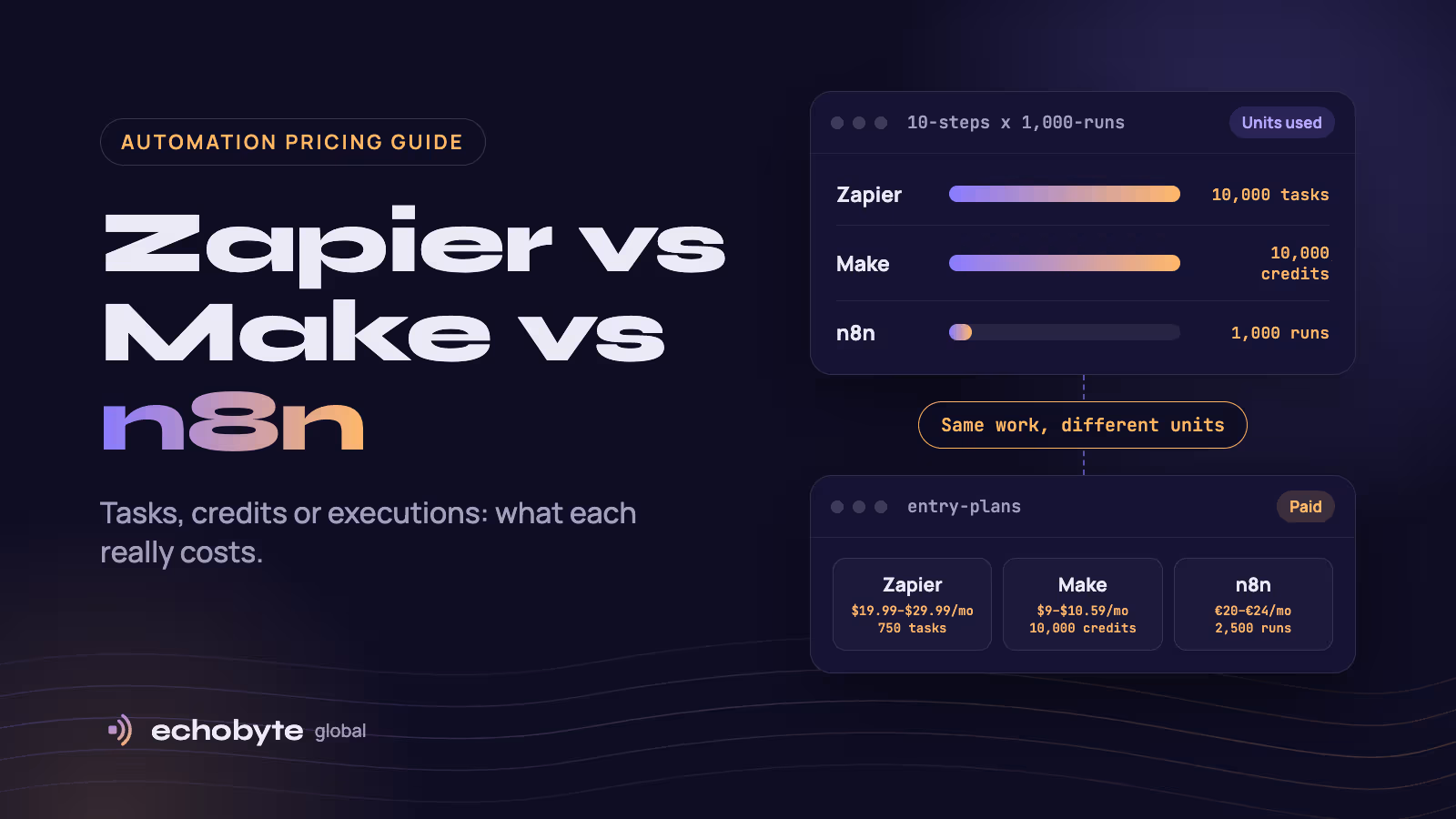
In Zapier vs Make vs n8n, Zapier is the easiest to start with, Make is usually the cheapest for visual workflows, and n8n is the most flexible and the cheapest at high volume if you can self-host it. The deciding factor is how each tool bills. Zapier charges per task, which is each action step. Make charges per credit, which is one per module action. n8n charges per workflow execution, however many steps it has. Entry paid plans run about $19.99 to $29.99 a month for 750 Zapier tasks, $9 to $10.59 for 10,000 Make credits, and €20 to €24 for 2,500 n8n executions. n8n’s self-hosted Community Edition is free.
We compare the three on pricing, billing units, AI agents, self-hosting and hidden limits, with a worked cost example. Then we cover who should pick which, and when to outgrow no-code tools. We build custom automation and AI agents as part of our software work, so we also say when a no-code tool is enough. Prices were checked in October 2026 and change often, so confirm them on each vendor’s pricing page.
Key takeaways
- The same workflow uses very different numbers of billing units. A 10-step workflow that runs 1,000 times a month uses about 10,000 Zapier tasks, about 10,000 Make credits and 1,000 n8n executions.
- Make is commonly three to five times cheaper than Zapier at equal volume, according to independent comparisons.
- n8n is free to self-host, but “free” means you pay for a server and your own time.
- All three can call language models, which adds model fees on top of the platform fee.
- Pick on your team’s skills and volume, not on the headline price.
How do Zapier, Make and n8n compare at a glance?
| Zapier | Make | n8n | |
|---|---|---|---|
| Best for | Non-technical users who want the simplest setup | Visual builders who want low prices | Technical teams, high volume and data control |
| What it bills | Tasks (each action step) | Credits (one per module action) | Workflow executions |
| Free plan | 100 tasks a month | 1,000 credits a month | No cloud free plan, free self-hosted Community Edition |
| Entry paid plan | $19.99 a month (annual) or $29.99 (monthly) for 750 tasks | $9 (annual) or $10.59 (monthly) for 10,000 credits | €20 (annual) or €24 (monthly) for 2,500 executions |
| Self-hosting | No | No | Yes |
| AI agents | Built-in AI features, with Agents and Chatbots sold as separate products | AI agents included on paid plans, according to one comparison | AI agent nodes, and you bring your own model key |
| Learning curve | Lowest | Medium | Highest |
Prices come from Lindy’s October 2026 Zapier review, Latenode’s September 2026 reading of Make’s pricing page and CloudZero’s n8n pricing guide. Guides disagree on some Zapier numbers, so treat any figure as a starting point and check the live price.
Why do billing units change what you pay?
The same workflow uses a different number of units in each tool. Take a workflow with 10 action steps that runs 1,000 times a month.
| Tool | Units used | What covers it |
|---|---|---|
| Zapier | About 10,000 tasks, since each action counts | Professional’s entry tier covers 750 tasks, so you need a higher task tier. Check Zapier’s price slider |
| Make | About 10,000 credits, one per module action | Core covers 10,000 credits for $9 to $10.59, though triggers and loops also use credits |
| n8n | 1,000 executions, because steps do not count | Starter covers 2,500 executions for €20 to €24, and self-hosted n8n has no execution limit |
At low volume the difference is small. At high volume it is large. Composio says that for equivalent volume Make tends to run three to five times cheaper than Zapier. Toolradar-sourced comparisons put the gap even wider for some workloads.
Watch for credits that disappear in the background. One review points out that a Make trigger that polls every 5 minutes uses about 8,640 credits a month on its own (12 checks an hour, 24 hours a day, 30 days). On Make’s 10,000-credit Core plan that would leave very little for real work. An instant trigger such as a webhook avoids this. Loops also count every iteration.
What do Zapier’s plans cost?
| Plan | Monthly billing | Annual billing | What you get |
|---|---|---|---|
| Free | $0 | $0 | 100 tasks a month, limited to simple Zaps |
| Professional | $29.99 | $19.99 | From 750 tasks, multi-step Zaps, filters and webhooks |
| Team | $103.50 | $69 | From 2,000 tasks and shared workspaces |
| Enterprise | Custom | Custom | Custom volume, security and support |
Annual billing saves about 33%. You can buy higher task tiers inside each plan, from 1,500 up to millions of tasks a month. One guide reports that overages are billed at 1.25 times your base rate, so check this before you rely on it. Zapier’s AI Agents and Chatbots are sold as separate products alongside the core plans, so budget for them separately if you want them.
What do Make’s plans cost?
| Plan | Monthly billing | Annual billing | Credits | Adds |
|---|---|---|---|---|
| Free | $0 | $0 | 1,000 a month | Routers and filters, and a small number of scenarios |
| Core | $10.59 | $9 | 10,000 a month | Unlimited scenarios |
| Pro | $18.82 | $16 | 10,000 a month | Custom variables, priority execution |
| Teams | $34.12 | $29 | 10,000 a month | Team roles and shared scenario templates |
Latenode read these figures from Make’s pricing page on September 14, 2026. Core, Pro and Teams all include the same 10,000 credits, and you pay more for features, not volume. Credits are the new name for what Make used to call operations, and plan prices did not change with the rename. Some older guides still show different prices, which is a sign of how often they move.
What do n8n’s plans cost?
| Plan | Monthly billing | Annual billing | Executions | Where it runs |
|---|---|---|---|---|
| Community Edition | Free | Free | Unlimited | Your own server |
| Starter | €24 | €20 | 2,500 | n8n Cloud |
| Pro | €60 | €50 | 10,000 | n8n Cloud |
| Business | €800 | €667 | 40,000 | Self-hosted only |
| Enterprise | Custom | Custom | Custom | Cloud or self-hosted |
Every plan includes unlimited users and workflows. According to a guide from Orchestra, execution length is capped at 5 minutes on Starter and 40 minutes on Pro and Business, so long-running jobs can be cut off. Toolradar reports that workflows pause when you hit the limit on Starter and Pro, with no overage. The jump from Pro to Business is steep because Business adds SSO, Git version control and other governance features.
Is n8n really free?
The software is free to self-host. Running it is not. n8n’s Community Edition has unlimited executions, workflows and users under its Sustainable Use License, which allows you to self-host for your own team but not to resell it as a managed service. You pay for:
- A server. A small virtual server costs roughly $4 to $7 a month, and more for production loads.
- Your time. Updates, backups, uptime and security are on you.
- Missing features. The Community Edition does not include SSO, admin roles or built-in error alerting, so you need external monitoring.
Self-hosting is worth it when volume is high, when you need to keep data on your own infrastructure for compliance, or when you want full control. If nobody on your team can maintain a server, n8n Cloud or another tool may cost less in practice.
Which tool is best for AI agents and AI workflows?
All three can call a language model, and n8n is the most flexible for agent-style workflows. The model fees are separate from the platform fee. RaftLabs estimates model usage at about $50 to $300 a month for 1,000 to 5,000 queries, and $200 to $1,500 for 10,000 to 50,000.
| Tool | AI approach | Watch out for |
|---|---|---|
| Zapier | AI steps in Zaps, plus separate Agents and Chatbots products | Add-on prices on top of task usage |
| Make | AI agents and modules that run inside scenarios | Every module action still uses a credit |
| n8n | AI agent and model nodes you wire up yourself, with your own API key | More setup, and you manage model costs and error handling |
These are review and vendor claims, so test one real workflow on each free tier before you commit. For ideas on which jobs to automate first, see our guide to AI agents for small business. If you are weighing a custom agent, our AI agent development cost guide explains build and running costs.
Which one should you pick?
| Your situation | Likely pick | Why |
|---|---|---|
| Non-technical, a few simple automations, many different apps | Zapier | Simplest setup and broad app coverage |
| Visual builder, moderate to high volume, tight budget | Make | Low price per unit and a visual canvas |
| Technical team, high volume, complex logic or AI agents | n8n Cloud or self-hosted | Execution-based billing and the most flexibility |
| Strict data control or compliance needs | n8n self-hosted | Your data stays on your infrastructure |
| Automation is part of your product, or spans four or more systems | A custom build | Reliability, ownership and logic that platforms cannot cover |
If you are unsure, build the same simple workflow in two tools on their free plans and compare how many units each uses.
What are the hidden costs and limits?
- Task and credit burn. Multi-step workflows, loops and polling triggers use units faster than you expect.
- Overages and pauses. Zapier charges overages. n8n Starter and Pro workflows pause at the cap. Know which you get.
- Plan jumps. Moving from Zapier’s Professional to Team, or n8n Pro to Business, can cost far more than the extra volume suggests.
- Model fees. AI steps add usage fees from the model provider.
- Maintenance. Someone must watch for failed runs and fix them. A broken lead workflow costs sales while nobody notices.
- Price changes. Make renamed operations to credits in late 2025, and vendors adjust plans regularly.
Set up tracking so you can see when automations succeed or fail. Our analytics service configures events and dashboards for that.
When should you outgrow no-code tools?
Move to custom software when the work is core to your business or too complex for a canvas. Warning signs:
- The workflow touches four or more systems, or needs strict error handling and audit trails.
- Compliance or data residency rules rule out vendor clouds.
- Run costs approach what a custom build would cost within a year or two.
- You want to ship the automation as a feature of your own product.
- Your team spends more time maintaining workflows than the workflows save.
Leanware suggests a ready-made platform when your total automation spend is under roughly $1,500 a month or the workflow lives in one system, and a custom build when it spans four or more systems or has compliance needs. Our AI agent development cost guide shows what custom agents cost.
How do we help with automation at Echobyte?
Our custom software service builds automation and AI agents over your data: LLM features, RAG assistants and automated workflows, using OpenAI and Gemini with Next.js, Node.js, TypeScript, PostgreSQL and AWS. Projects start from $8,000 and typically take 8 to 20 weeks. We scope in phases with a fixed quote for each, show working software every two weeks, and you own the code and accounts.
We will tell you honestly if a no-code tool is enough. A discovery call maps your workflows and shows what to automate first. See our pricing page for starting prices.
Zapier vs Make vs n8n FAQ
Which is cheaper, Zapier, Make or n8n?
At the same volume, n8n is usually cheapest, especially self-hosted, and Make is usually cheaper than Zapier. Independent comparisons put Make at three to five times cheaper than Zapier. The real answer depends on how many steps your workflows have, because each tool counts different units.
Is n8n really free?
The self-hosted Community Edition is free software with unlimited executions. You still pay for a server, and you maintain it. n8n Cloud starts at about €20 to €24 a month.
Is Make better than Zapier?
Make is better for visual, multi-step workflows and lower prices. Zapier is better for the simplest setup and the broadest app coverage. Many people try both on the free plans.
Which is best for AI agents?
n8n is the most flexible for agent-style workflows, while Zapier is easiest for non-technical users and Make sits between them. All three add language model fees on top of the platform price.
What is a Zapier task, a Make credit and an n8n execution?
A Zapier task is one action step that runs successfully. A Make credit is one module action. An n8n execution is one run of a whole workflow, however many steps it has.
Can I self-host Zapier or Make?
No. Only n8n offers a self-hosted version, and its Community Edition is free to run on your own server.
Can I switch between them later?
Yes, but you have to rebuild the workflows, because each tool has its own format. Keep your workflows simple and documented so a move is easier.
When should I build custom automation instead?
When the work spans several systems, needs compliance controls, is part of your product, or costs more to maintain than it saves. Start with a no-code tool and move to custom only when it stops fitting.
Not sure which route fits? Our team maps your workflows and builds the automation, and every project starts with a free discovery call and a fixed quote.
Sources
- Zapier Pricing 2026, Lindy, October 2026
- Make.com Pricing in 2026: Plans, Credits and What a Scenario Run Costs, Latenode, September 2026
- n8n Pricing: Plans, Costs, and MCP Explained, Orchestra, October 2026
- n8n Pricing, CloudZero
- n8n Pricing 2026: n8n Is Free, Running It Isn’t, selfhost.dev, September 2026
- 8 Best Zapier Alternatives in 2026, Composio
- Make vs Zapier vs n8n: The Honest Founder Pick, Cut the SaaS
- How Much Does Make Cost?, Hackceleration
- AI Agent Development Cost in 2026, RaftLabs
- How Much Does an AI Agent Cost to Build and Run?, Leanware, October 2026