On this page
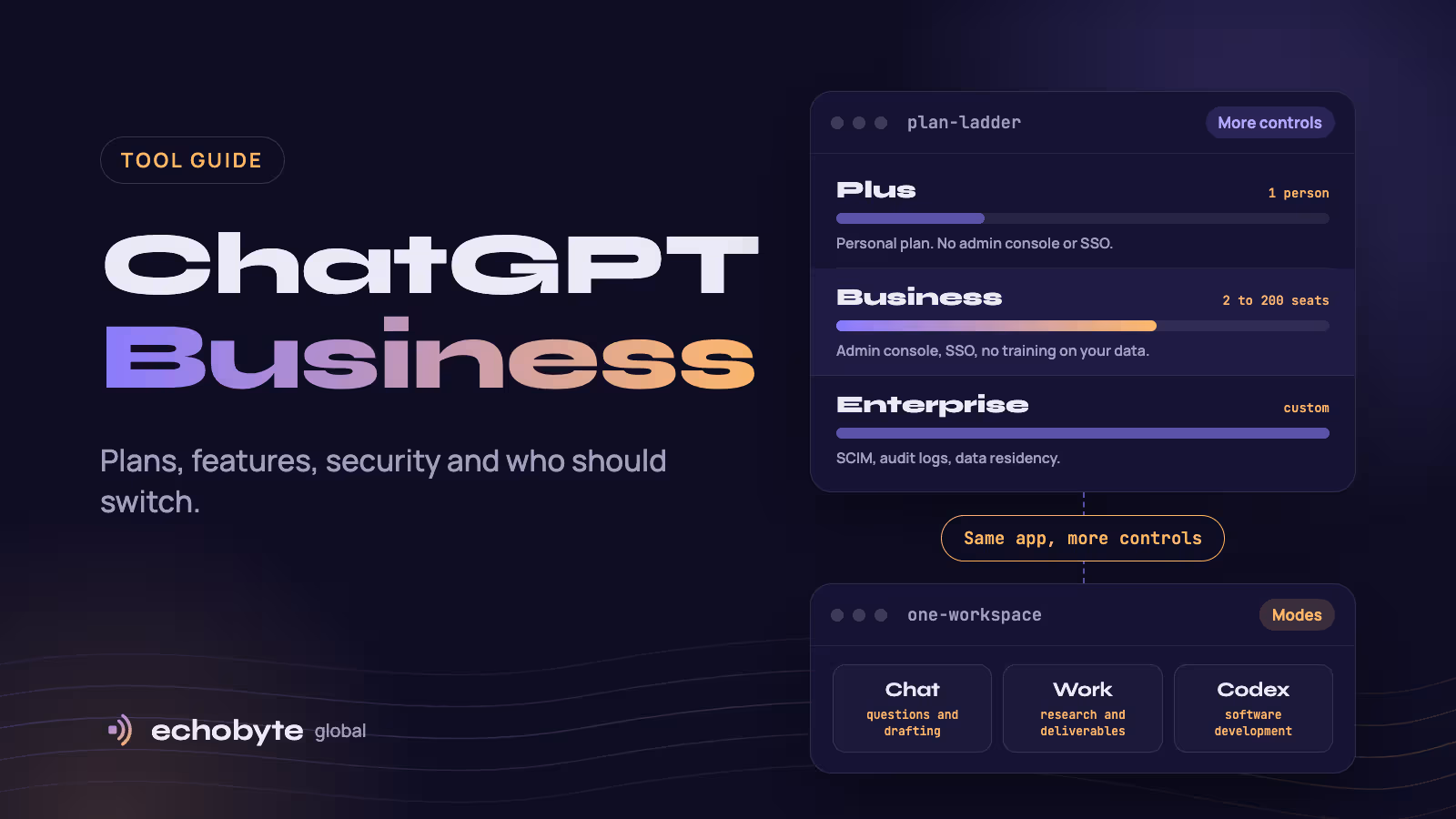
ChatGPT Business is OpenAI’s self-serve ChatGPT plan for teams, formerly called ChatGPT Team. OpenAI renamed it on August 29, 2025. In late 2026 a Standard seat costs $20 per user per month billed annually ($25 billed monthly), with a minimum of two seats, and gives you a shared workspace, an admin console, single sign-on, connectors to company apps, and a default promise that OpenAI won’t train on your workspace data. It is worth it for most teams as soon as more than one person uses ChatGPT for work or company data is involved. A single person can stay on Plus, and organizations that need SCIM provisioning, audit logs or data residency should look at Enterprise.
This guide explains what ChatGPT Business is, what it includes, what changed in 2026, how it compares with Plus and Enterprise, what it does not cover, how to decide whether it is worth it and how to roll it out in 30 days. OpenAI changes plans often, so check its pricing and release notes before you buy. Information was checked in November 2026.
Key takeaways
- Business is the team plan between Plus (one person) and Enterprise (large, sales-led deployments).
- Standard seats include ChatGPT, ChatGPT Work and Codex, and Premium seats add much higher usage limits.
- OpenAI says it does not train on your workspace’s data, and Business adds single sign-on, an admin console and spend controls.
- Business does not include SCIM, audit-log export, data residency or several compliance extras, according to OpenAI-related and third-party comparisons.
- Whether it pays off depends on adoption, so start with a pilot, a policy and three clear use cases.
What is ChatGPT Business?
It is a shared ChatGPT workspace for a team. Instead of each person buying their own Plus subscription, an organization buys seats, invites people and manages them centrally. According to OpenAI’s help center, Business gives you centralized billing, admin controls for users, roles and access, usage visibility and spend controls, and access to ChatGPT, ChatGPT Work and Codex. Workspaces have owners, admins, analytics viewers and members, and only owners can buy or change paid seats. It works on the web, on iPhone and Android, and in the new ChatGPT desktop app.
It is the same plan that used to be called ChatGPT Team. OpenAI says the rename did not change contracts, though pricing and seat options have changed since.
What does ChatGPT Business include?
| Feature | What it does |
|---|---|
| Shared workspace | One place for the team’s chats, projects and shared assistants |
| ChatGPT (Chat) | The core assistant for questions, drafting, analysis and voice |
| ChatGPT Work | OpenAI’s agentic product for research and finished deliverables |
| Codex | OpenAI’s coding agent, included in Standard and Premium seats |
| GPTs and Projects | Custom assistants and shared project spaces with instructions and files |
| Apps and Company Knowledge | Connectors to tools such as Google Drive, Microsoft 365, Slack and GitHub, with search across your company content that respects each user’s permissions |
| Agent and Deep Research | Multi-step tasks and long research reports |
| Plugins | Packaged skills and apps for specific workflows, with admin controls |
| Admin console | Manage members, seat types, roles, plugins and workspace settings |
| Single sign-on and MFA | SAML SSO and multi-factor authentication |
| Privacy controls | A Privacy Center and locked chats that hide selected conversations behind a PIN or device authentication |
| Office add-ins | ChatGPT for Word is available, with Excel and PowerPoint integrations described in OpenAI’s release notes |
The first two rows of detail come from OpenAI’s ChatGPT Business overview and release notes. Features and limits can vary by workspace and rollout, so check what your workspace shows. Plus and Pro subscribers reportedly do not get Company Knowledge, which is one of the practical reasons teams move to Business.
What changed in ChatGPT Business in 2026?
| Date (2026) | Change |
|---|---|
| April 2 | OpenAI added flexible, credit-based pricing and a usage-based Codex seat, and reportedly cut the annual Business price from $25 to $20 per seat |
| June 24 | New self-serve workspaces can no longer add the legacy Codex-only seat |
| July 9 | ChatGPT Work launched, with a new desktop app that brings Chat, Work and Codex together. OpenAI also retired the Atlas browser, with its agent capabilities moving into ChatGPT and Codex |
| August 24 | A subscription is capped at 200 paid Standard and Premium seats |
| September 17 | ChatGPT for Word became available for Business |
| September 21 | Privacy Center began rolling out to signed-in Business users |
| October 7 | GPT-6 began rolling out in Chat to eligible Business workspaces |
| October 20–21 | Locked chats were added, and workspace settings moved into the Admin Console |
| October 28 | Promotional API credits became available for eligible Business workspaces |
The pace matters: features arrive in stages and depend on your workspace, so treat any feature list, including this one, as a snapshot.
How does ChatGPT Business compare with Plus and Enterprise?
| Capability | Plus | Business | Enterprise |
|---|---|---|---|
| Who it is for | One person | Teams of 2 to 200 seats | Large organizations and regulated buyers |
| Price | About $20 a month | $20 a seat annual, $25 monthly (Standard) | Custom, through sales |
| Training on your data | A user setting | Not used by default | Not used |
| Admin console and shared workspace | No | Yes | Yes, with global administration |
| Single sign-on | No | SAML SSO and MFA | Yes |
| Company Knowledge and connectors | Limited | Yes | Yes, with more controls |
| SCIM provisioning and role-based access | No | No | Yes |
| Audit logs and Compliance API | No | No | Yes |
| Data residency | No | No | Yes, in several regions |
| Invoicing and purchase orders | No | Reportedly card only | Yes |
The Enterprise column and the “No” entries for Business come from comparisons by Composio, Coworker and others rather than a single OpenAI table. Third-party sources also report ISO certifications, IP allowlisting, enterprise key management and a HIPAA business associate agreement as Enterprise-only, and a typical Enterprise minimum of around 150 seats, which OpenAI does not publish. Some guides disagree on small details such as which analytics views Business includes, so confirm anything your compliance team relies on.
How does ChatGPT Business pricing work?
Per seat, plus optional credits. OpenAI’s help center lists these seat prices in US dollars, which may vary by country:
| Seat type | Monthly plan | Annual plan (billed yearly) | What it includes |
|---|---|---|---|
| Standard | $25 per user | $20 per user | ChatGPT, ChatGPT Work and Codex |
| Premium | $125 per user | $100 per user | The same, with about 5 times the usage and no five-hour usage limit |
A workspace needs at least two paid seats in total, and any mix of Standard and Premium works. Beyond the included limits, you can buy workspace credits under flexible pricing, and voice and some agent features draw from credits. API usage is separate and billed on its own.
An illustration, not a quote: a 10-person team on Standard seats billed annually pays about $2,400 a year ($200 a month). Make two of those seats Premium and it comes to about $4,320 a year. Plan a separate budget for credits if people use agents heavily, and use the spend controls. Unused seats are not refunded for the current billing period, and only owners can change seat counts.
What about privacy and security?
OpenAI states that it does not train on your workspace data. Business follows OpenAI’s Business Terms and Enterprise Privacy commitments. Data is encrypted in transit and at rest, and the plan includes SOC 2 coverage, SAML single sign-on and MFA.
What to plan around:
- Missing controls. Business reportedly lacks SCIM, audit-log export through a Compliance API and data residency. If a client or regulator names any of these, Enterprise is the answer.
- Connected apps are access. When you connect Drive, Slack or email, the assistant can read what that user can read. Connect only what a use case needs, review the connector permissions, and use the admin controls for external access and plugins.
- Agents act. Agent features can click, write and send. Keep human approval on actions that move money, change records or message customers. Our AI browsers guide explains why hidden instructions on web pages are a risk for agents.
- Set a policy. Decide what data may and may not go in, who reviews outputs and where AI-written work needs disclosure.
Who should choose what?
| Your situation | Likely choice |
|---|---|
| You work alone and handle no client-confidential data | Plus |
| Two or more people use ChatGPT for work, or company data is involved | Business |
| You need SSO and a no-training default, with under about 200 users | Business |
| You need SCIM, audit logs, data residency, ISO certifications or invoicing | Enterprise |
| You are building your own product or automation | The API, which is billed separately |
| Your company already runs on Microsoft 365 or Google Workspace and their AI meets your needs | Compare those first, then decide |
Is ChatGPT Business worth it?
It is worth it when the time it saves exceeds the seat price, and the controls matter to you. Use this simple test:
Monthly value = hours saved per person per week × 4.3 × hourly cost of that person’s time.
An illustration: someone who saves two hours a week at $30 an hour gets about $258 of time back a month, against a $20 to $25 seat. Even a fraction of that covers the cost, but only if the time is real and the work is checked. Measure it with a pilot before you count on it.
It is probably not worth it if few people will use it, if your data needs Enterprise-level controls, or if another tool you already pay for covers the same tasks. A seat that nobody uses is the most expensive kind.
What are the main use cases for each team?
| Team | Good uses | Watch out for |
|---|---|---|
| Marketing | First drafts, briefs, repurposing content, research | Facts, brand voice and originality need a human check |
| Sales | Call summaries, proposals from templates, account research | Customer data in prompts and invented claims |
| Support | Draft replies, knowledge-base search, ticket summaries | Wrong answers sent to customers |
| Operations | SOPs, process documents, spreadsheets and analysis | Errors in numbers, so verify calculations |
| Finance | Summaries and reconciliation help | Sensitive data and audit needs |
| HR | Job descriptions, policy drafts, onboarding material | Bias and confidential employee data |
| Engineering | Code, reviews and tests with Codex | Security review and secrets in prompts |
How do you roll it out in 30 days?
- Week 1: Decide and set up. Name an owner, write a short acceptable-use policy, create the workspace, set up SSO if you use it and limit connectors to what you need.
- Week 1: Pick three use cases. Choose tasks that happen weekly and are easy to check, such as meeting summaries, first-draft proposals or research briefs.
- Week 2: Pilot with a small group. Give 5 to 10 people seats, share a few Projects or custom assistants and hold a short training session.
- Week 3: Measure. Track time saved, quality problems and credit usage. Ask what people stopped using.
- Week 4: Decide. Keep, add or remove seats, consider Premium for heavy users, set credit and spend controls, and write down what you learned.
How does it compare with other team AI plans?
Other vendors sell team plans, including Microsoft 365 Copilot, Google’s Gemini for Workspace and Anthropic’s plans for teams. The right choice depends on where your documents live, which models and features your tasks need, the admin controls you need and what your people will actually use. Run the same three tasks on each shortlisted tool before you commit.
What if ChatGPT Business is not enough?
A general assistant is the right first step, but it does not run your business processes by itself. When you need an assistant that works inside your own systems, such as qualifying leads, updating a CRM or answering questions from your own data, you are into automation or custom AI agents. Our guide to AI agents for small business shows nine use cases that work, our Zapier vs Make vs n8n comparison covers no-code automation, and our AI agent development cost guide explains when building makes sense. For the build-versus-buy question more broadly, see our custom software development cost guide.
How can Echobyte help?
We do not resell ChatGPT. We build the custom software and automation around it. Our custom software service covers AI agents and workflow automation, starting from $8,000 per project and typically taking 8 to 20 weeks, with a discovery workshop and phased fixed quotes, and you own the code. If you are not sure whether you need a plan, a no-code tool or a custom build, a free discovery call is the quickest way to find out. See our pricing page for starting prices.
ChatGPT Business FAQ
Is ChatGPT Business the same as ChatGPT Team?
Yes. OpenAI renamed ChatGPT Team to ChatGPT Business on August 29, 2025. Pricing and seat options have changed since the rename.
How much does ChatGPT Business cost?
Standard seats are $20 per user per month billed annually or $25 billed monthly, with a minimum of two seats. Premium seats are $100 annually or $125 monthly. Credits for usage beyond the included limits are extra, and the API is billed separately.
Does ChatGPT Business train on my data?
OpenAI says it does not train on your workspace’s data, under its Business Terms and Enterprise Privacy commitments.
What is the difference between ChatGPT Business and Plus?
Plus is a personal plan with no admin console or single sign-on. Business adds a shared workspace, admin controls, SSO, spend controls, connectors with Company Knowledge and a no-training default.
What is the difference between ChatGPT Business and Enterprise?
Enterprise adds controls such as SCIM provisioning, role-based access, audit logs and a Compliance API, data residency and compliance certifications, with custom pricing and contracts. Third-party comparisons report these as Enterprise-only, so confirm with OpenAI.
How many seats can I have?
At least two, and starting August 24, 2026, a maximum of 200 paid Standard and Premium seats per subscription.
Does ChatGPT Business include Codex and ChatGPT Work?
Yes. Standard and Premium seats both include ChatGPT, ChatGPT Work and Codex, with different usage limits.
Is ChatGPT Business HIPAA compliant?
OpenAI’s business associate agreement is reported as an Enterprise-only feature, so do not put protected health information in Business without confirming your arrangement with OpenAI and your counsel.
Not sure if a plan, an automation or a custom AI agent is right for your team? We map your workflows and give you a fixed quote for the first phase, with a free discovery call.
Sources
- ChatGPT Business overview, OpenAI Help Center
- ChatGPT Business: General FAQ, OpenAI Help Center
- ChatGPT Business: Release Notes, OpenAI Help Center
- Is ChatGPT Business the same as ChatGPT Team? and billing FAQ, OpenAI Help Center
- ChatGPT Business vs Enterprise: What IT actually gets for connectors and audit, Composio, November 2026
- ChatGPT Enterprise Pricing 2026, Coworker
- ChatGPT Business Pricing: Team, Business and Enterprise, Elephas, September 2026
- ChatGPT Business, Carly
- OpenAI says it’s doubling Pro usage limits and bringing Work features to Chat, BleepingComputer, November 2026