On this page
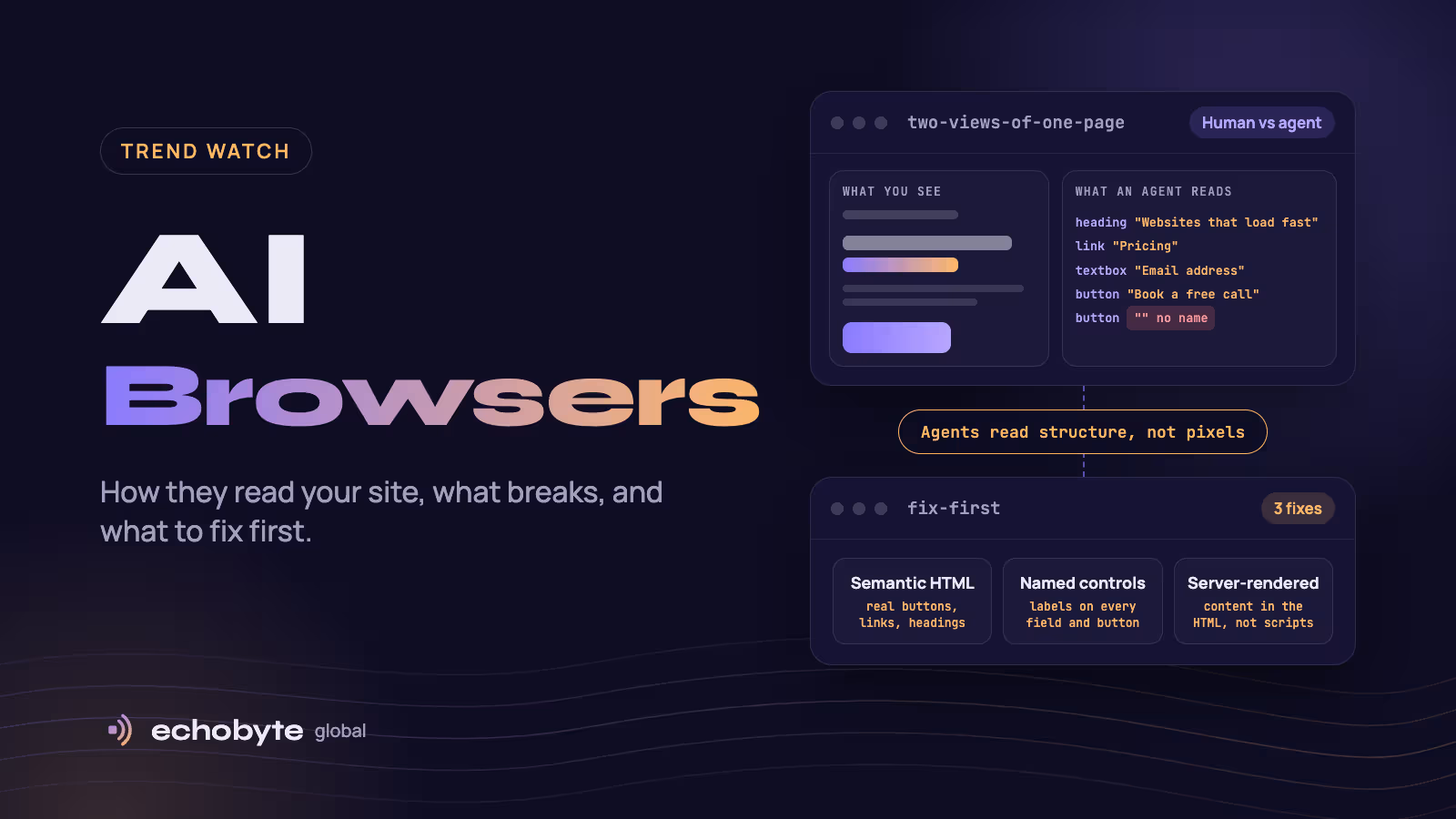
An AI browser is a web browser with a built-in AI assistant that can summarize pages and, in many cases, click, type and complete tasks for the user. For website owners, the important part is that the visitor may be an agent. It reads your page through a simplified structure called the accessibility tree rather than looking at it, it may look like an ordinary visitor in your analytics, and it can be misled by hidden text on a page. Dedicated AI browsers still have a small share of users, and the category is moving fast: OpenAI shut down the standalone ChatGPT Atlas browser in August 2026, while Chrome, Edge and others keep adding agent features. The fixes that help are mostly good practice anyway: semantic HTML, named buttons and fields, server-rendered content, careful bot rules, security hygiene and better analytics.
This guide explains what AI browsers are, how big they really are, how they read a website, what changes for SEO, forms, analytics and security, a readiness checklist and a 15-minute test you can run yourself. The landscape changes quickly and some claims come from vendor reports, so we say where the evidence is thin. Information was checked in November 2026.
Key takeaways
- AI browsers read your page mainly through the accessibility tree, the same structure screen readers use, often combined with screenshots.
- Dedicated AI browsers are still a small share of browsing, but automated and agent traffic is growing fast, so the preparation is worth doing now.
- Unnamed buttons, unlabeled fields, content that only loads through scripts and heavy pop-ups are the most common blockers.
- Prompt injection, where hidden text steers an agent, is an unsolved security problem. Treat any text on your pages as something an agent may read.
- You can test your own site in 15 minutes with a free AI browser.
What is an AI browser?
It is a browser that puts an AI assistant at the center of browsing. Most have two layers: a chat or sidebar that summarizes pages, compares tabs and answers questions, and an agent mode that can click, scroll, fill forms and complete multi-step tasks such as comparing products or booking an appointment.
| Browser | Type | Status in late 2026 (reports) |
|---|---|---|
| Perplexity Comet | AI-native | Launched July 2025, reported free at the base tier and available on desktop and mobile |
| Dia | AI-native | Launched by The Browser Company, mainly on macOS |
| Opera Neon | AI-native | Opera’s agentic browser |
| Chrome with Gemini | Incumbent with AI features | Gemini in Chrome since September 2025, with auto browse that can scroll and click |
| Edge with Copilot Mode | Incumbent with AI features | Copilot Mode added in July 2025, with browse-and-act features |
| Brave with Leo | Incumbent with AI features | AI assistant built into Brave |
| ChatGPT Atlas | AI-native | Launched on macOS on October 21, 2025, and reported retired on August 9, 2026 |
OpenAI said it would fold browser-based agent work into the ChatGPT desktop app instead, according to reports in Secure Privacy’s AI browser guide and other coverage. That reversal is a good reminder not to build your strategy around one product.
How big are AI browsers really?
Small in share, large in direction. Chrome held about two-thirds to 70% of global browser sessions in 2026, depending on the tracker. When Atlas launched, Statcounter data showed Dia and Comet below 1%. No independent analytics vendor publishes reliable AI browser market share, and one landscape review calls the category “still a rounding error” in actual usage.
The bigger signal is automated traffic in general:
- Imperva’s 2025 Bad Bot Report found automated traffic passed human traffic in 2024, at 51% of web interactions.
- Cloudflare reported in June 2026, as cited in a UX Design article, that automated traffic reached about 57% of page requests against 43% from humans.
- HUMAN Security’s 2026 report recorded 7,851% year-over-year growth in traffic from AI agents and agentic browsers, according to a Discovered Labs summary.
These are vendor and security-company figures from different methods, and “automated” includes search crawlers, scrapers and monitoring, so they do not mean AI browsers are half your traffic. They do show that machine visitors are a large and growing audience.
How do AI browsers read your website?
Mostly through the accessibility tree, sometimes with screenshots. The accessibility tree is a simplified version of your page that browsers build for screen readers. It lists the headings, links, buttons, form fields and landmarks, with their names and roles. A page’s code may have thousands of nodes, and the tree reduces them to what a user or agent can interact with.
| System | How it reads pages |
|---|---|
| OpenAI (Atlas and its agent) | Combines screenshots, the page’s code and the accessibility tree, and OpenAI’s own guidance says Atlas uses ARIA labels and roles to interpret structure |
| Perplexity Comet | Hybrid of accessibility tree snapshots and selective vision, according to Perplexity’s BrowseSafe research |
| Playwright MCP | Accessibility snapshots, with no screenshots |
This comes from Search Engine Journal’s guide to how AI agents see your website. Two practical consequences:
- A control with no name is invisible in practice. An icon button with no accessible name shows up in the tree as just a button. The agent can see something is there and cannot tell what it does.
- Scripts can hide content. Agents that don’t run JavaScript see only the HTML. Content, and structured data added by scripts after the page loads, may never reach them.
What changes for website owners?
| Area | What can go wrong | What helps |
|---|---|---|
| Content and rendering | Text, prices or structured data that only appear after scripts run | Server-render key content and structured data |
| Forms and checkout | Unlabeled fields, buttons with no names, custom widgets that aren’t real controls | Real <button> and <input> elements, visible labels, clear error messages |
| Navigation | Div-based menus, unclear headings, popups that block the page | Semantic landmarks, one H1, logical H2 and H3, dismissible popups |
| Cookie banners | A banner that agents cannot click, or that blocks the whole page | Real accept and reject buttons with accessible names |
| Bot defenses | Security rules that block legitimate agents, or let abusive ones through | Review bot-protection rules, allow verified agents, rate-limit abuse |
| Analytics | Agent sessions mixed with human visits, inflating or distorting numbers | Check server logs, segment traffic, and track AI referrals separately |
| Security | Hidden or user-supplied text steering an agent | Sanitize user content and confirm risky actions |
| SEO | Unclear structure that makes pages harder to summarize or cite | Answer-first writing, clear headings and sourced facts |
Whether agent browsers honor robots.txt varies by product and by whether the agent acts on a user’s direct request, so don’t rely on it as protection. If your site uses Cloudflare or a similar service, check whether default bot rules block AI user agents you want.
What about prompt injection and security?
Prompt injection is when text on a page tricks an AI agent into following the page’s instructions instead of the user’s. The text can be invisible to people, such as white-on-white text or hidden elements. In August 2025, Brave researchers showed Comet could be steered by hidden text on a web page. OpenAI’s chief information security officer called prompt injection a frontier, unsolved security problem when Atlas launched, and OpenAI later said it may never be fully solved for agentic browsers. In December 2025, Gartner advised enterprises to block AI browsers for now. Gartner’s advisory is aimed at employers deciding what staff can install, not at website owners, but it shows how seriously the risk is taken.
What this means for your site:
- Assume agents read all the text on your pages, including text you hide visually.
- Sanitize user-generated content such as reviews, comments, profile fields and support messages. A 2026 study accepted at IEEE S&P found 13% of randomly selected ecommerce sites exposed chatbot plugins to indirect prompt injection through third-party content like product reviews.
- Never put instructions for AI in hidden text. It looks like manipulation, and it may break platform rules.
- Add confirmation steps for risky actions such as payments, account changes and deletions, so an agent cannot complete them silently.
- Re-authenticate sensitive actions and keep session lifetimes short.
- Monitor logs and set rate limits for unusual automated behavior.
What is the AI browser readiness checklist?
- Use semantic HTML. Real headings, lists, links, buttons and landmarks, not clickable divs.
- Name every control. Icon buttons and fields need accessible names, using visible labels or
aria-label. - Label every form field and explain errors in text.
- Keep important content in the HTML. Prices, product details and structured data should not depend on scripts.
- Use one logical heading structure per page, with a descriptive H1.
- Make pop-ups and cookie banners dismissible with real buttons.
- Check bot protection. Allow verified AI agents you want, and avoid blanket blocks.
- Avoid hard walls on important paths. A CAPTCHA before basic information blocks legitimate agents and many human visitors.
- Keep layouts and element IDs stable, so agents don’t lose track of controls.
- Review user-generated content and sanitize it.
- Segment analytics. Look at server logs and add rules to separate automated sessions.
- Test it. Use the 15-minute test below.
Many of these are accessibility basics. Our website audit checklist covers accessibility and structure checks, and our mobile-first design guide covers clean layouts.
How do you test your site with an AI browser in 15 minutes?
Install a free AI browser such as Comet, or use Chrome’s Gemini features, and give it five tasks on your own site:
- “Find the pricing and summarize it.” Can it find the page and read it correctly?
- “Summarize what this company does.” Does the answer match your messaging?
- “Fill in the contact form, but don’t send it.” Does it find every field and understand the labels?
- “Compare this company with a competitor.” What does it quote, and is it accurate?
- “Start a purchase or booking on a test item.” Where does it get stuck?
Write down every point where it fails or guesses. Common causes are unnamed buttons, unlabeled fields, content that loads through scripts, pop-ups and CAPTCHAs. Then check your server logs and analytics for how the visit appears. Fix the worst issue first and test again.
What does this mean for SEO and AI search?
AI browsers sit on top of the same web, so the basics of being clear, trusted and easy to read apply. An assistant that summarizes a page in a sidebar can only quote what it can parse. We don’t yet have solid data on how AI browser use changes traffic or conversion, so be wary of claims that do. Our guide on whether SEO is dead covers the wider shift in clicks, and our AI search optimization guide explains how AI systems find and cite sources. If you sell online, our Universal Commerce Protocol explainer covers the protocols that let agents shop. Our Google Consent Mode v2 guide covers consent and measurement, which agent visits can complicate.
What happens next?
These are predictions, not facts. Expect more agent features to arrive inside the browsers people already use, since standalone products such as Atlas can be withdrawn. Expect standards such as WebMCP, which lets pages expose tools to agents, to mature in parallel with browser features. Expect security guidance and bot-management tools to catch up. The safest bet is the unglamorous one: clean, accessible, server-rendered pages serve people, search engines and agents alike.
How can Echobyte help?
Our web development service builds fast Next.js sites with metadata, sitemaps and structured data, and our SEO service starts with a technical audit, with no ranking guarantee. Our analytics service sets up tracking and can help separate automated traffic. If you want accessibility and agent-readiness checks included, tell us on the first call so they are part of the scope. See our pricing page for starting prices.
AI browsers FAQ
What is an AI browser?
A browser with a built-in AI assistant that can summarize pages and, in agent mode, click, type and complete tasks. Examples include Perplexity Comet, Dia, Opera Neon, and Chrome and Edge with AI features.
Are AI browsers safe?
They carry real risks, especially prompt injection, where hidden text steers the agent. OpenAI has called it an unsolved problem, and Gartner advised enterprises in December 2025 to block AI browsers for now.
Is ChatGPT Atlas still available?
No. OpenAI reportedly retired the standalone Atlas browser on August 9, 2026 and moved browser-based agent work into the ChatGPT desktop app.
How do AI browsers read websites?
Mostly through the accessibility tree, the structure used by screen readers, often combined with screenshots. OpenAI says Atlas uses ARIA labels and roles to interpret pages.
Will AI browsers hurt my SEO or traffic?
There is no solid data yet. Dedicated AI browsers are a small share of usage, and assistants may summarize pages in sidebars. Clear, accessible, well-sourced pages are the best preparation.
How can I tell if AI agents visit my site?
Check server logs and bot-management reports, and segment analytics. Agentic browsers can look like ordinary browsers, so logs and behavior patterns are more reliable than the user agent alone.
Should I block AI browsers or agents?
Block abusive automation and protect sensitive actions, but avoid blanket blocks that stop legitimate agents and assistive tools. Decide based on what your business wants agents to do.
What is the first thing to fix?
Name your buttons and label your form fields, and make sure important content is in the HTML. Then test with an AI browser and fix what breaks.
Want to know how your site looks to an AI agent? Our team tests it, fixes the blockers and sets up tracking, and every project starts with a free discovery call and a fixed quote.
Sources
- How AI Agents See Your Website (And How To Build For Them), Search Engine Journal
- Secret agent bot: accessibility matters for the agents even if you can’t see them, UX Collective
- Agentic browsing tools: a practical guide, Discovered Labs
- A Step-by-Step Look at How AI Agents Browse and Act on Websites, Crazy Egg
- AI browser security governance guide, Secure Privacy
- Keep AI browsers out of your enterprise, warns Gartner, CSO Online
- Block all AI browsers for the foreseeable future: Gartner, The Register
- AI web browsers are here. They’re not safe, Quartz
- The agentic browser landscape in 2026, DEV Community
- Selling To AI: The Complete Guide To Agentic Commerce, Search Engine Journal