On this page
The web design trends that matter in 2027 are the ones that make websites faster, clearer and easier to use for both people and machines. That means accessibility treated as a design constraint from the first wireframe, performance-first visuals, readable expressive typography, purposeful motion, content that AI assistants and agents can read, modular design systems, and AI used inside the workflow instead of splashed across the page. Looks such as maximalism, neo-brutalism and kinetic type come and go, while the durable trends reduce friction, build trust and keep pages fast.
This guide separates what to adopt now, what to pilot and what to skip, and ends with a six-step way to check your own site. Trend lists are opinions, so we explain the reasoning behind each one. Information was checked in November 2026.
Key takeaways
- Accessibility and performance are the trends that compound. They rarely go out of style and they protect revenue.
- Design for machines too. AI assistants and agent browsers read your page through its structure, so clean semantic HTML is now a design decision.
- Use motion and bold typography where they help the message, and keep them light, accessible and easy to maintain.
- Use AI to explore and repeat, not to replace review. People still need to check brand, accessibility, accuracy and speed.
- Skip effects that slow the page or hide content, however current they look.
How do you decide whether a trend is worth adopting?
Run it through four tests before it reaches your site.
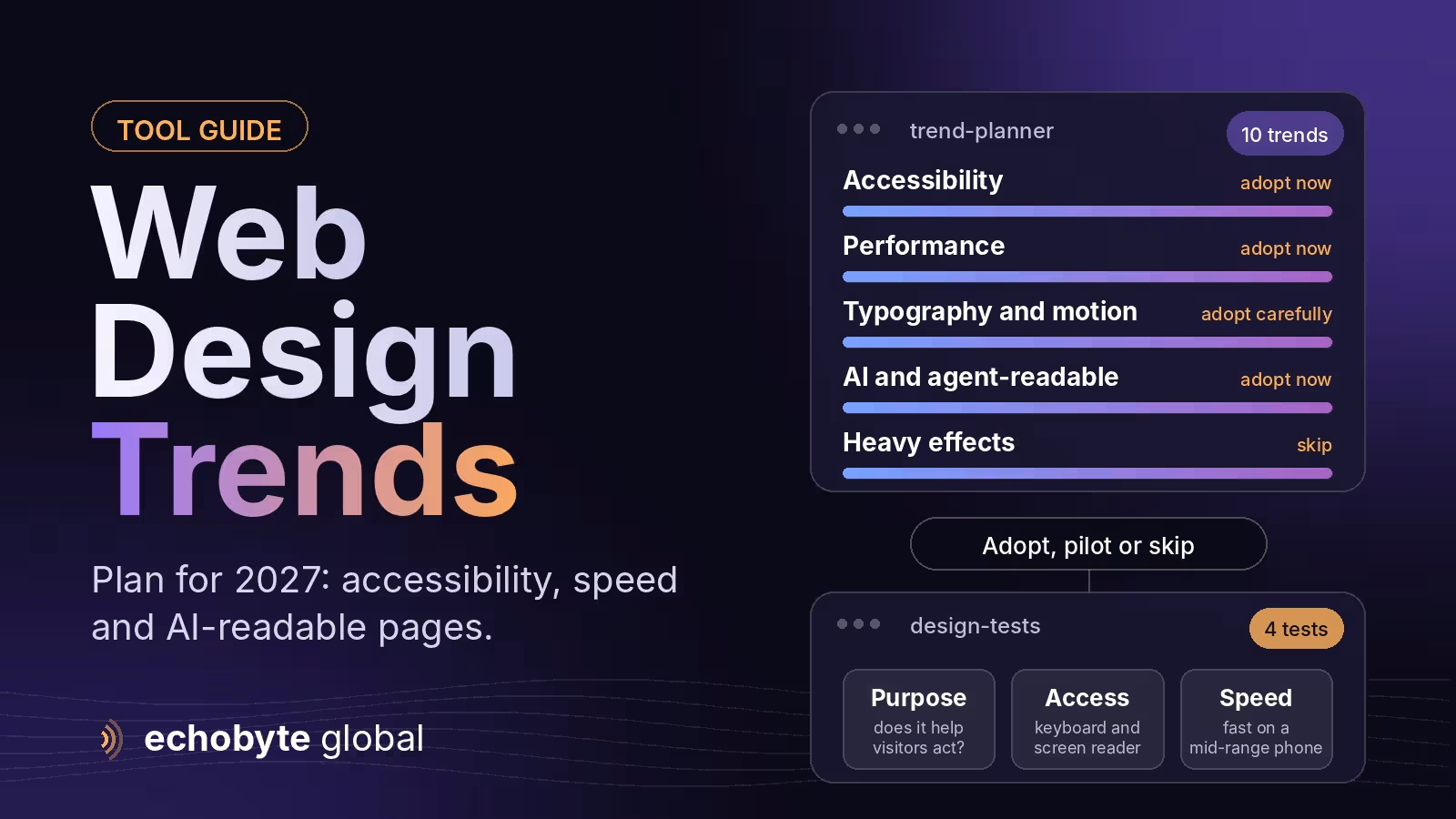
| Test | The question | It fails when |
|---|---|---|
| Purpose | Does it help visitors do what they came to do? | It is decoration that delays the message |
| Accessibility | Can everyone use it, including with a keyboard or screen reader? | It relies on color, motion or hover alone |
| Performance | Does the page stay fast on a mid-range phone? | It adds heavy scripts, video or fonts |
| Maintenance | Can your team keep it working in two years? | It depends on custom code nobody owns |
Which web design trends should you plan for in 2027?
1. Accessibility as a design constraint
The most important trend is not a look at all. It is treating accessibility as a constraint from the first wireframe instead of a checklist at the end. Rules are tightening in several regions, for example the European Accessibility Act, which applies to many products and services in the EU from June 2025, and accessibility lawsuits are common in the United States. In practice this means enough color contrast, visible focus states, labeled form fields, a logical heading order and captions for video. Accessible design and fast design usually line up: real text instead of text baked into images is both more accessible and lighter, and native HTML controls need less JavaScript.
2. Performance-first visuals
Design with a speed budget. Google’s “good” Core Web Vitals thresholds are a Largest Contentful Paint of 2.5 seconds or less, an Interaction to Next Paint of 200 milliseconds or less and a Cumulative Layout Shift of 0.1 or less. Plan the hero image or heading to be the fastest element, limit font families and weights, compress images, and think twice before autoplay video. Rich visuals and fast pages can coexist when someone owns the budget.
3. Bold, readable typography
Oversized headlines, variable fonts and strong hierarchy help visitors understand an offer in seconds, especially on phones. Keep it readable: check contrast, keep line lengths comfortable, and load fonts efficiently so text appears quickly.
4. Motion with a purpose
Motion works when it explains something: a menu that opens, a step that completes, a section that reveals. Prefer CSS transforms and opacity, which browsers can run smoothly, and respect the reduced-motion setting so people who are sensitive to movement can turn it off. Keep micro-interactions short, and never let animation block content. Our best animated websites guide shows examples and how to add animation without hurting speed or SEO.
5. Content structured for AI assistants and agents
More discovery now happens through AI summaries and agent browsers. They read your page through its structure, not its looks, so semantic HTML, clear headings, accessible names for buttons and fields, answer-first paragraphs and content that exists in the HTML all matter. Our AI browsers guide explains how agents read pages, our AI search optimization guide covers being cited, and our Universal Commerce Protocol guide covers stores.
6. Modular design systems
A small system of tokens (colors, spacing, type) and reusable components lets teams build pages quickly without drifting off-brand. It matters more as AI tools and page builders generate pages, because unmanaged one-off pages become technical debt. Document the rules and keep the component list short.
7. AI inside the workflow, not splashed on the page
AI is most useful for exploration, variations and repetitive work such as drafts, alt text and resizing. People still need to review brand fit, accessibility, factual accuracy, privacy and performance. As AI-made design becomes common, some brands respond with deliberately human, imperfect or brutalist looks to stand out. That can work for a distinctive brand, but use it sparingly and keep it usable.
8. Personalization with consent
Showing returning visitors a relevant next step, or adapting content to a visitor’s location or industry, can raise conversions. It depends on privacy and consent, so start simple and respect each visitor’s choices. Our Google Consent Mode v2 guide covers consent for Google tags.
9. Clearer conversion design
Durable trends reduce friction: a hero with one promise and one action, simpler navigation, short forms, and proof such as reviews and certifications placed near the call to action. Measure the effect instead of assuming it.
10. Lighter, more sustainable pages
Smaller pages, fewer third-party scripts and less autoplay media help speed, cost and energy use at the same time. This trend overlaps with performance, so it is rarely a trade-off.
What should you adopt, pilot or skip?
| Trend | Verdict | Why |
|---|---|---|
| Accessibility-first design | Adopt now | Legal, usability and SEO benefits |
| Performance budgets | Adopt now | Directly affects experience and Core Web Vitals |
| Agent-readable content | Adopt now | Cheap, and helps search and AI tools |
| Purposeful motion | Adopt carefully | Keep it light and respect reduced motion |
| Kinetic typography and scroll storytelling | Pilot | Strong for brand pages, risky for speed |
| AI personalization | Pilot | Needs consent and clean data |
| Heavy 3D and WebGL everywhere | Skip for most sites | Slow and hard to maintain |
| Autoplay video backgrounds | Skip | Slow, distracting and hard to make accessible |
| Text baked into images | Skip | Inaccessible and heavy |
| Chatbot pop-ups on every page | Skip | Interrupts visitors and lowers trust |
How do you check your own site against these trends?
- Measure first. Record your Core Web Vitals, conversion rate and accessibility score before changing anything.
- Run an accessibility check. Use an automated tool, then test with a keyboard only.
- Review motion. Check what moves, whether it helps and whether reduced motion is respected.
- Test with an AI browser. Ask it to find your pricing and fill your contact form, and note where it gets stuck.
- Audit your scripts and fonts. Remove anything that doesn’t earn its weight.
- Pick three changes. Choose the ones with the biggest effect on speed, clarity or accessibility, and measure again.
Our website audit checklist has 40 checks, and our mobile-first design guide covers designing for phones first.
What do these trends mean for small business websites?
You don’t need to chase every trend. For most small businesses, the highest-value moves are a fast, accessible, clear site, strong proof such as reviews and real photos, and a structure that search engines and AI tools can read. Add motion and bold typography to a brand page if they fit, and skip anything you can’t maintain. A website redesign is a good moment to apply these, and our website redesign cost guide explains what it involves.
How can Echobyte help?
Our UI/UX design service designs clear, accessible interfaces, and our web development service builds fast Next.js sites with metadata, sitemaps and structured data from day one. If you want accessibility and agent-readiness checks included, tell us on the first call so they are part of the scope. See our pricing page for starting prices.
Web design trends FAQ
What are the biggest web design trends for 2027?
Accessibility as a core constraint, performance-first visuals, bold readable typography, purposeful motion, content that AI assistants can read, modular design systems and AI used within the workflow.
Are web design trends worth following?
Only the durable ones. Trends that improve speed, clarity, accessibility and trust pay off, while purely decorative ones date quickly.
Is minimal or maximal design better?
Neither is better by default. Choose what fits your brand and audience, and keep the page fast, accessible and clear.
How do I design a website for AI assistants?
Use semantic HTML, clear headings, accessible names for controls and answer-first content that exists in the HTML, and test with an AI browser.
Does web design affect SEO?
Yes. Speed, mobile usability, structure and content clarity all affect how well pages perform in search and how easily AI tools can read them.
How often should I redesign my website?
When it no longer meets your goals, usually every few years. Between redesigns, improve speed, content and accessibility continuously.
Want an honest review of how your site stacks up? We audit design, speed and accessibility together, and every project starts with a free discovery call.
Sources
- Web Design Trends 2027: 12 Shifts Shaping Websites, Lovart
- Web design trends in 2026: what drives leads, trust and visibility, Naturaily
- 27 web design trends for 2026, iTechGuides
- Web Design Trends 2026: The Definitive Guide, Line25
- Web Design Trends to Watch in 2026, Made Good Designs
- Top Web Design Trends for 2026, Figma